Simple OC Power Distribution Supply Replacement
Prerequisites
Procedure
- Remove Right Side Cover.
Figure 1. Simple OC Power Distribution Supply Replacement
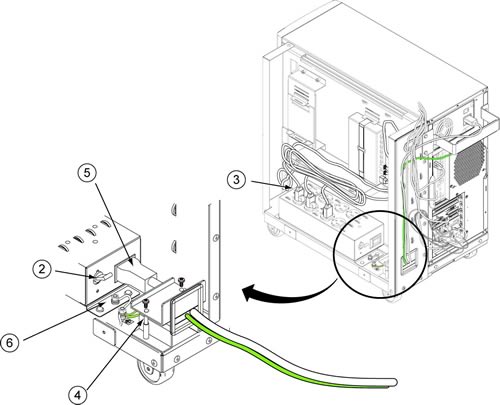
- Shut off the CB of Power Distribution Supply
- Disconnect the all power plugs from the receptacle of power supply.
- Remove the PDU cable clump by removing 2 bolts.
- Remove the PDU cable.
- Remove the Grounding cable
- Remove 4 screws fixing the Power Distribution Supply
- Take out the Power Distribution Supply.
- Restore the new Simple OC Power Distribution Supply
- Turn the CB of the new Power Distribution Supply to the ON position.
- Restore Simple OC by reverse order of removal.
1 Finalization
Procedure
- Turn the Simple OC circuit breakers on the PDU of System Cabinet back to the ON position.
- Verify that the system boot up.
- Log in.
- User name: sdc
- Password: adw2.0
- Verify that the system is fully booted.
- Perform Signal to Noise - Head Scan