Replacing Speaker
Prerequisites
Procedure for replacing the speaker located in the rear end bell.
1 Speaker Removal
Procedure
- Perform Lock out / Tag Out. Refer to Lockout / Tagout for System Cabinet PDU Main Breaker.
- Remove three (3) screws holding the speaker in place. See Figure 1.
Figure 1. SPEAKER ASSEMBLY
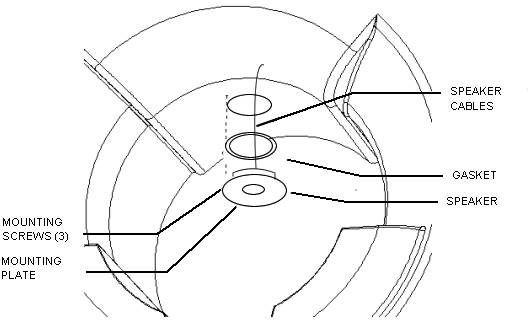
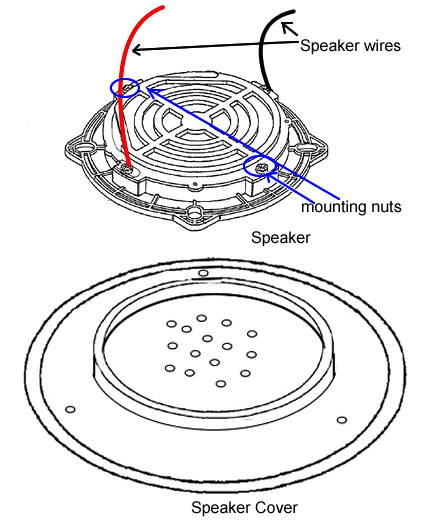
- Drop speaker assembly down and remove two (2) push on speaker wire connections. See Figure 2.
- Remove two (2) nuts holding the speaker to the mounting plate. See Figure 2.
- Lift speaker off of mounting plate.
Figure 2. SPEAKER ASSEMBLY DETAIL
2 Speaker Installation
Procedure
- Secure new speaker to the mounting plate with two (2) nuts.
- Plug in the speaker wires.
- Secure the speaker assembly to the rear end bell using three (3) screws removed earlier.
- Remove tag-out tag from circuit breaker. Refer to Lockout / Tagout for System Cabinet PDU Main Breaker.
3 Finalization
Procedure
- Check the intercom function. Basically, intercom adjustment of GOC Audio Box is not required. If necessary, perform Intercom Adjustment For Simple OC Audio Board as troubleshooting.
- Perform Signal to Noise - Head Scan..