Refill Coolant after replacement of SRFD3, XFA, or XFD-PS
Prerequisites
Procedure
- Observe that there is no leakage.
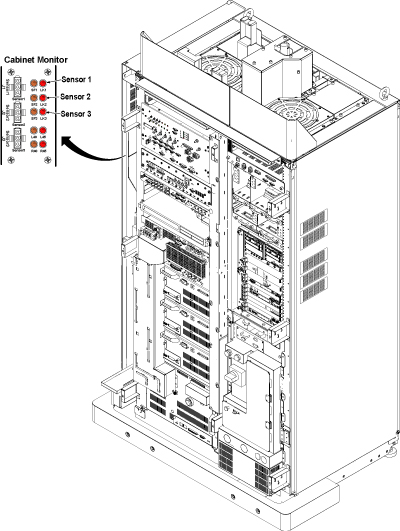
- Check the Cabinet Monitor and leakage LED is not lit for each
sensor.note:
There are three Leak sensor routes.
-
Leak Sensor 1 (5142232, 5138563)
-
Leak Sensor 2 (5151295, 5151296, 5151297, 5142231, 5138564)
-
Leak Sensor 3 (5151297-2, 5142231-2, 5142224)
If the Leak Sensor1 detects the leakage, Main Breaker is tripped and System will be shut down.
If the Leak Sensor2 detects the leakage, LK2 LED is lit and error message is displayed on Host and Emergency Stop will work.
If the Leak Sensor3 detects the leakage, LK3 LED is lit and error message is displayed.
Figure 1. Cabinet Monitor Check
-
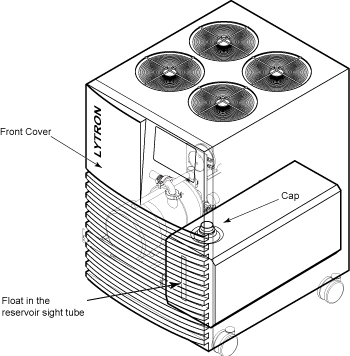
- Remove cap of the reservoir.
- For MCS, open front cover and access to the cap of the reservoir.
Figure 2. MCS
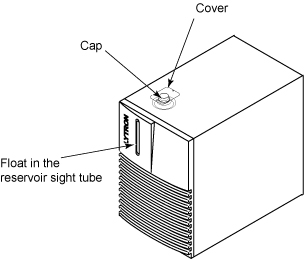
- For LCS, remove water filler cover on top of the unit to access
the reservoir.
Figure 3. LCS
- For MCS, open front cover and access to the cap of the reservoir.
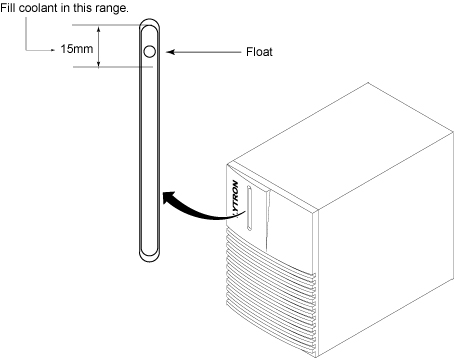
- Fill the reservoir. Check the float in the reservoir sight tube
on the front of the unit to see the coolant level in the tank as you
are filling. Fill the coolant so that the float reaches near the upper
limit. Then, close the cap of the reservoir.
Figure 4. MCS Gauge
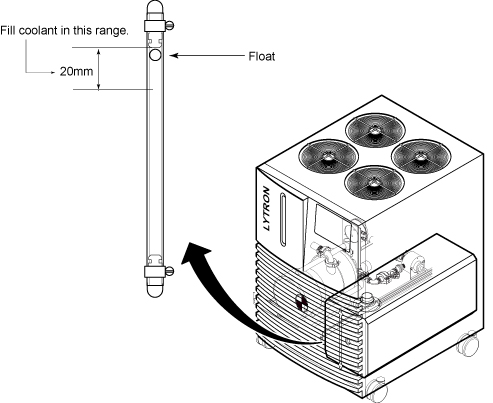
Figure 5. LCS Gauge
- Restore the water filler cover on top of the unit to access the reservoir.
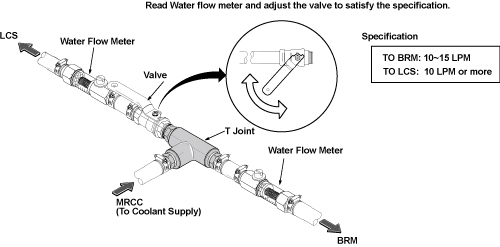
- For LCS, read the water flow meters and check that the water
flow satisfies the specification.
Figure 6. water flow level check
Finalization
No finalization steps.