Passive Shim (S-V Magnets Only)
Prerequisites
This procedure applies to S-V magnets only.
Procedure
- Perform a 12-plane, 500 Hz, LVshim scan. For TwinSpeed, use GradMode=WHOLE.
- After the scan is complete, go to the Service Desktop and open the Service Browser if it's not already running.
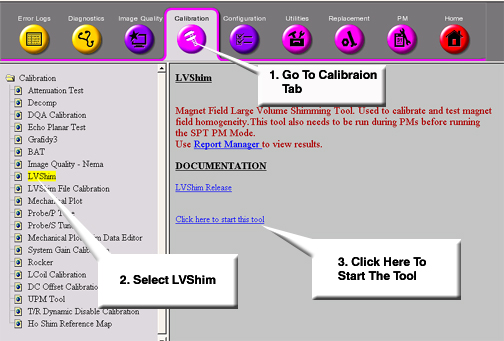
- Start the LVShim tools as shown in .
Figure 1. STARTING THE LVSHIM TOOL FROM THE SERVICE BROWSER
- TwinSpeed, highlight WHOLE and click on OK.
- Continue as follows:
- Install passive shims per the LVshim analysis.
- Re-enter S/C shim currents from last iteration.
- Perform another LVshim scan, analyze the results, and perform another passive shim iteration if analysis does not meet specifications.
Finalization
No finalization steps.