NEC LCD 2490WUXi2 Replacement
Prerequisites
1 Monitor Replacement
Procedure
- notice
- Replace the monitor.
 |
2 Calibrate NEC Monitor (For LCD2490WUXi2)
Procedure
- See Figure 1 and Figure 2 for control locations and functions.
Figure 1. NEC LCD2490WUXi2 OnView Controls
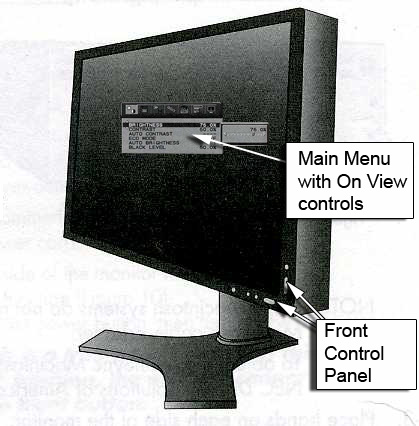
Figure 2. Control Panel
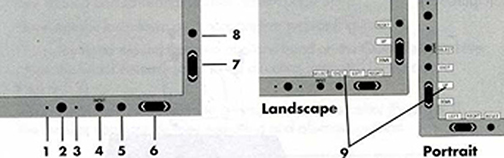
* The Left/Right and Up/Down buttons functionality is interchangeable depending on the orientation (landscape/portrait) of the OSM.
- To display the Main Menu, press button either 5, 6 or 7.
Figure 3. Main Menu
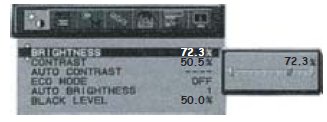
- Refer to Table 2 for Monitor Settings.
- To save adjustments, press the 5 button.
- To exit the menu, press the 5 button again.
3 Gamma Setting (Required only if monitor is replaced from different type)
Procedure
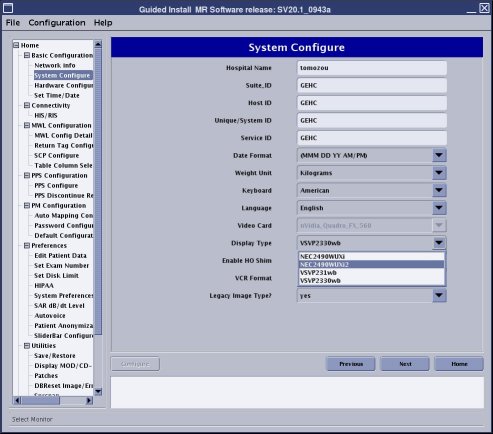
- Go to the Service Desktop and start the Service Browser. Select [Configure tab] , then select Guided Install, [FE mode] . Then Click here to [start this tool] . The password is ‘operator’.
- Select [System Configure].
- Select [LCD] from Display Type and select NEC2490WUXi2 from
[Display type] selection.
Figure 4. Gamma Setting
4 Camera Setting by Vendor (Required only if monitor is replaced from different type)
Camera setting by Camera vendor is required when Display Type is replaced from different type. Arrangements must be made with the customer to adjust camera settings by vendor.
Finalization
No finalization steps.