LCC Dock Removal and Reinstallation
Prerequisites
Procedure for replacement of the following dock components for 1.5T and 3.0T LCC magnets:
-
Dock limit switch board
-
Dock gear motor and clutch assembly
1 Removal of Dock
Procedure
 danger
- Perform LOTO on the PDU. See the MR Service Safety Manual, PN 5452735:
- Undock the patient table and remove it from the magnet room.
- Disconnect the two cables attached to the dock. These should be the runs going to the dock assembly (MG2 A29) and the dock limit switch (MG2 A31).
- To help reposition the dock during reinstallation, mark the placement of the dock on the floor. Depending on the site’s need, place tape on floor at the leading edge of the dock, and on the right and left sides.
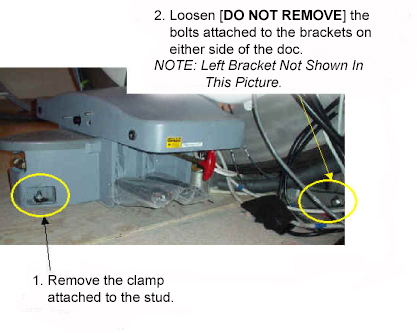
- Loosen the bolts attaching the dock assembly at the front and
to the right and left brackets.
Figure 1. Loosen Dock Attachment Bolts
- warning
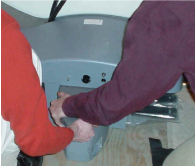
- While applying pressure to the top of the dock, completely remove
all dock attachment bolts.
Figure 2. Applying Downward Pressure to Dock
- There are two methods for clearing the anchor stud out of the
path of the dock assembly:
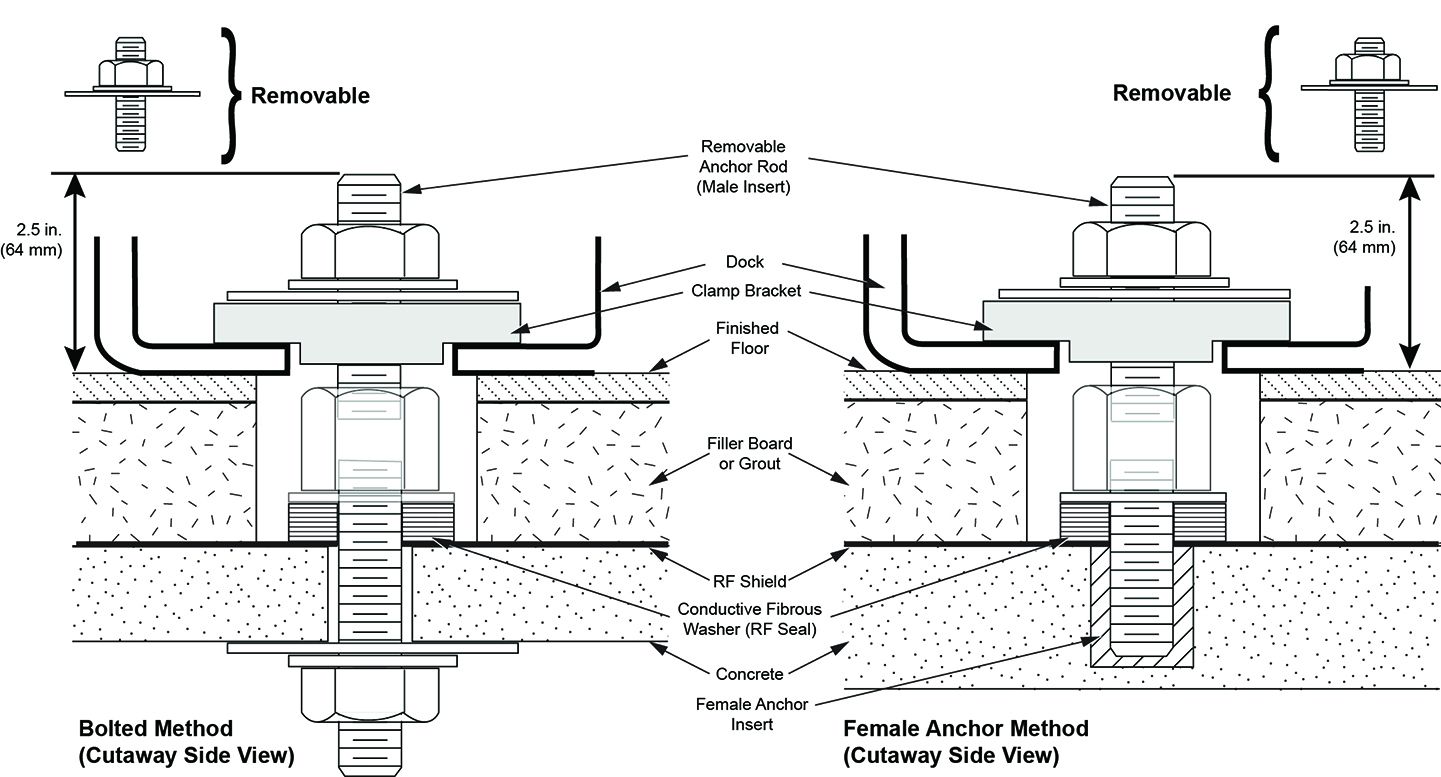
- Preferred Method: If the site has followed the Pre-Installation Manual, the top portion of the stud should be removable so the dock remains flush with the floor during removal.
- If the site has an anchor stud that protrudes vertically from
the floor and cannot be removed, a nonconformance must be raised with the customer, and the anchor must be fixed to comply
with the Pre-Installation Manual prior to any future servicing of
the dock. To fix the anchor stud this time:
-
Measure the height of the anchor stud as indicated in the illustration below. If the height exceeds 2 inches (5 cm), the magnet must be ramped down prior to removing or installing the dock, because there is significant risk of the magnet attracting the dock if it needs to be raised more than 2 inches (5 cm).
Figure 3. Measuring Height of Anchor Stud
-
Use two people to hold down the dock and slide the dock away from the magnet until the stud in the front is hitting the inner frame.
-
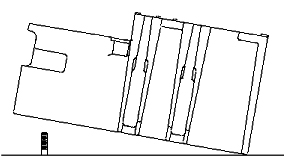
Use two people to lift the dock just enough to clear the top of the stud in the floor. Then pivot the dock to clear the stud.
Figure 4. Lifting Dock Enough to Clear Floor Stud
-
Replace the dock on the floor immediately to the side of the anchor stud.
Figure 5. Replacing Dock to Side of Floor Stud
-
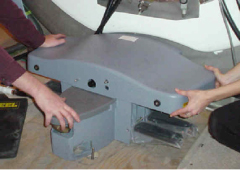
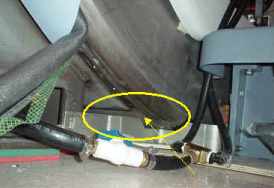
- note:When the distance between the dock and the magnet is at least equivalent to the distance between the magnet and where the foot of the patient table would normally be located, both field engineers may slowly lift the dock from the floor and exit the magnet room.It should not be extremely difficult for two FEs to pull the dock away from the magnet after all bolts are removed. If difficulty is encountered, check that the brackets are not caught against the front of the magnet.
Figure 6. Interference between Bracket and Magnet
 |
 |
2 Replacement of Dock Limit Switch
Procedure
- Only proceed with removing the dock limit switch after removal of the dock is completed in Removal of Dock.
- Remove the dock control assembly.
Figure 7. Removal of Dock Control Assembly
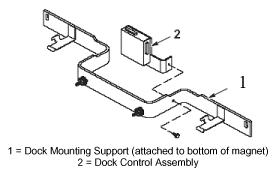
- After the dock control assembly is detached from the dock mounting support, perform the remainder of this replacement procedure outside the magnet room.
- Access the circuit board internal to the dock control assembly.
Figure 8. Removal and Replacement of Dock Limit Switch Board
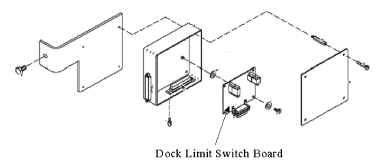
- Replace the dock limit switch board.
- Reassemble the dock control assembly as shown in Figure 7.
- warning
- Follow the instructions in Installation of Dock to install the dock in the magnet room.
|
3 Replacement of Gear Motor and Clutch Assembly
Procedure
- warning
- Only proceed with removing motor and clutch assembly after removal of dock is completed in Removal of Dock.
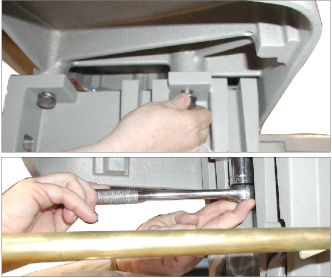
- Remove the upper cover of the dock by unbolting the four hex
bolts.
Figure 9. Removing Hex Bolts from Under Dock Cover
- Slightly lift the cover and disconnect all electrical connections between the cover and the base of the dock assembly. (The connections will be the ground connection for the motor and the harness for the dock motor.)
- Remove the dock cover from the base.
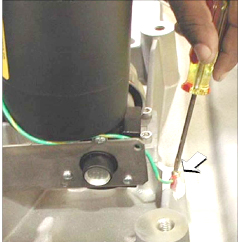
- Disconnect the motor ground lug from the cover.
Figure 10. Motor Ground Lug Removal
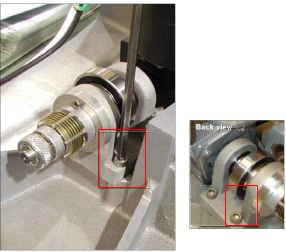
- Remove the four mounting screws for the motor.
Figure 11. Removing Motor Mounting Screws
- Remove the existing motor, and install the replacement.
- Attach the motor by replacing the four mounting screws for the motor. (See Figure 11 for the location of screws.)
- Attach the motor ground lug to the cover.
- Replace the dock cover on the base.
- Reconnect all electrical connections between the cover and the base of the dock assembly. (The connections are the ground connection for the motor and the harness for the dock motor.)
- Replace the upper cover of the dock and secure by replacing the four hex bolts.
|
4 Replacement of Dock Pedal Wire Spring
Procedure
- warning
- Remove the dock from the magnet room. See Removal of Dock.
- Remove the dock cover by unbolting the four hex bolts. See Figure 9.
- Slightly lift the cover and disconnect all electrical connections between the cover and the base of the dock assembly. (The connections will be the ground connection for the motor and the harness for the dock motor.)
- Remove the dock cover from the base.
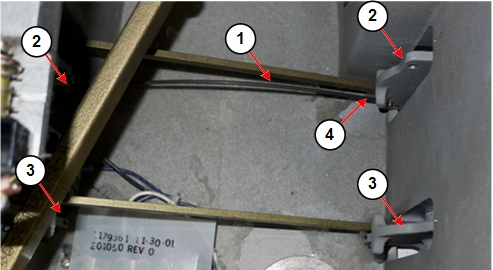
- Remove both of the old pedal springs from the dock pedals. The
springs are held in place only by spring tension. Pull up on one end
of each spring to remove them from the pedal assemblies.
Figure 12. Dock Pedal Spring Locations
- notice
- Grasp one end of the dock pedal spring. Insert the end of the
spring into the hole at the end of one of the dock pedals.
Figure 13. Hole for Dock Pedal Spring
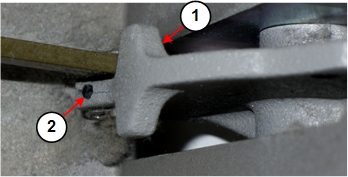
Figure 14. Inserting Dock Pedal Spring
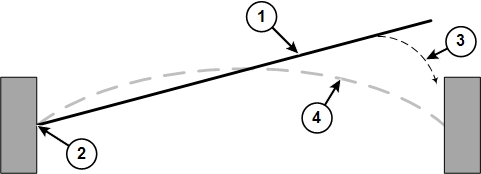
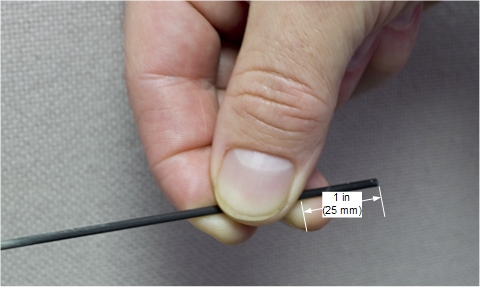
- Grasp the other end of the dock pedal spring (at approximately
1 inch (25 mm) from the free end of the spring), and gently insert
it into the hole at the end of the other dock pedal. It is easier
to insert the spring into the pedal if you press down on the pedal.
Figure 15. Dock Pedal Spring Grasp Point
- Repeat Step 6 and Step 7 for the other pedal spring.
- Replace the dock cover on the base.
- Reconnect all electrical connections between the cover and the base of the dock assembly. (The connections are the ground connection for the motor and the harness for the dock motor.)
- Replace the upper cover of the dock and secure by replacing the four hex bolts.
- Reinstall the dock. See Installation of Dock.
|
 |
5 Installation of Dock
Procedure
- warning
- With two field engineers, one holding each side of the dock, enter the magnet room and place the dock on the floor where the foot of the patient table would normally be located.
- With two field engineers, one applying vertical downward pressure to each side of the dock, slide the dock toward the magnet front.
- There are two methods to position the dock to clear the floor
stud:
- If the site followed the Pre-Installation Manual, it should be possible to remove the top portion of the stud when reinstalling the dock. Continue to maintain pressure on the top of the dock, while carefully sliding the dock against the base of the magnet, and reinstall the top portion of the anchor stud.
- If the site has an anchor stud that protrudes vertically from
the floor and cannot be removed, a nonconformance must be raised with the customer and the anchor must be fixed to comply
with the Pre-Installation Manual prior to any future servicing of
the dock. To fix the anchor stud this time:
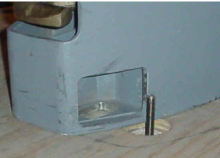
Figure 16. Placement of Dock
-
Measure the height of the anchor stud as indicated in the illustration below. If the height exceeds 2 inches (5 cm), the magnet must be ramped down prior to removing or installing the dock as there is significant risk of the magnet attracting the dock if it needs to be raised more than 2 inches (5 cm).
Figure 17. Measuring Height of Anchor Stud
-
While maintaining pressure to the top of the dock, position the dock against the base of the magnet to the side of the floor stud at the front of the dock.
-
Lift the dock just enough to clear the top of the stud in the floor as shown in Figure 4.
-
While rotating the dock, align the hole at the base of the dock with the stud and place the dock down into position. (The illustration below shows the dock hole to the side of the stud, but it is placed over the anchor stud.)
-
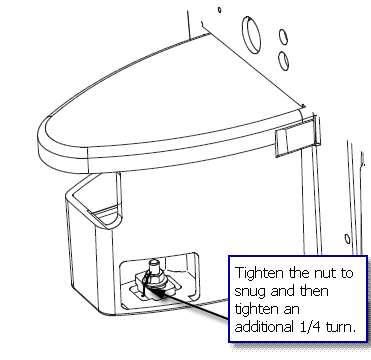
- Tighten the nut onto the anchor stud to snug, then tighten an
additional 1/4 turn. Excessive tightening may result in the stud being
pulled from the floor.
Figure 18. Tightening Nut
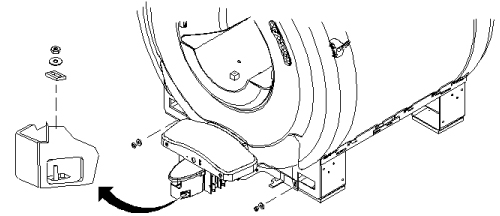
- Use the attachment bolts to secure the dock at the front stud
and side brackets of the magnet.
Figure 19. Securing Dock to Magnet
- Connect the cable to the dock assembly (MG2 A29) and to the dock limit switch (MG2 A31).
|
6 Finalization
Procedure
- Remove LOTO and restore power.
- Align and dock the table.
- Confirm that the dock motor ON switch operates properly when the Table Up pedal is pressed.