Installing Software Patches (General Guide)
Prerequisites
IMPORTANT: Make sure the Service Pack is installed immediately after completion of the Application Software Load process. See the latest revision of MR Service Pack Software Matrix, DOC1667089, available from the online documentation library.
When GE releases new software versions, it may be necessary to download and install updates to a Host PC. This document includes:
1 Determining Service Pack Information on System
Procedure
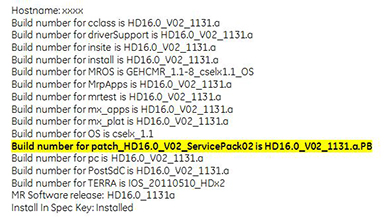
- Open up a C-shell, type getver and click enter.
- The Service Pack Information is noted in bold in the results
list. In the example shown below (for system HD16.0_V02), Service
Pack 02 is loaded.
Figure 1. Service Pack Information
- If the proper Service Pack has been loaded, obtain the GE Equipment Maintenance sticker (part number 5661793) and write the date and Service Pack number on the sticker and place the sticker on the GOC for future reference.
- Proceed to the next section if the latest service pack is not loaded per MR Service Pack Software matrix, DOC1667089.
2 Patch Load Procedure Overview
Procedure
- GO into Guided Install menu from Common Service Desktop (CSD) on the Service desktop. Click on Configure then Guided
- Click on Patches Tab. See Figure 2.
Figure 2. Patches Tab Display
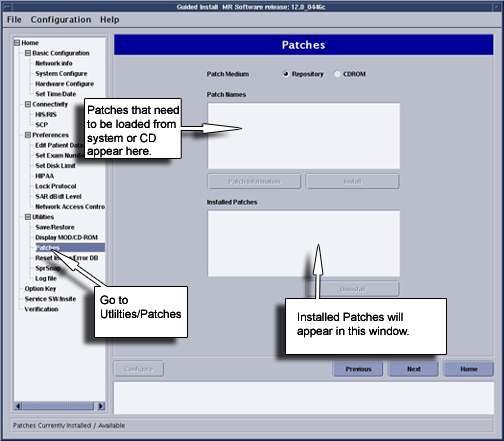
- From this GUI we can perform the following tasks:
- Determine patches that have been loaded onto the system disk by selecting Installed Patches option
- Determine patches that are on the CD-ROM by selecting CD-ROM option.
- Determine patches that have been downloaded to the /usr/g/insite/data via InSite by selecting Repository option.
- Help files can be viewed if available for patches on the system, CD-ROM, or in the /usr/g/insite/data directory by selecting the Patch Information
3 Installing A Patch
Procedure
- There are 2 options for loading patches, load from Repository
or load from CDROM.
- To load a patch from Repository (located in /usr/g/insite/data), select Repository. The list of applicable patches that have been downloaded to the site via InSite will appear on the GUI.
- To load a patch from CD-ROM, insert the Patch CD into the drive on the Linux PC. Select CD-ROM. The list of applicable patches that are on the CD will appear on the GUI.
- Click on the applicable patch that you want to load. The patch should be highlighted. See Figure 3note:
You can only load one patch at a time.
Figure 3. Selecting and Installing Patch
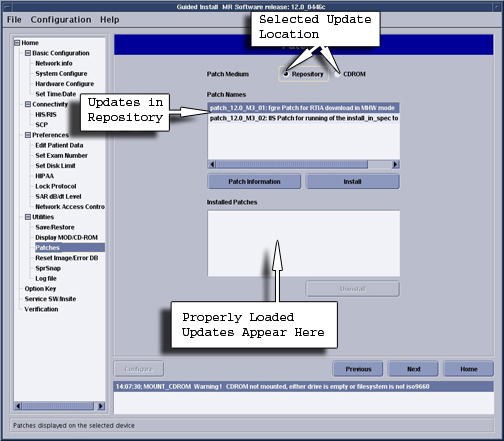
- To verify that the patch properly loaded, click in Installed
patches. The patch, if properly loaded will now appear. Also look
at the Status section of the Guided Install GUI. A message indicating Patch Load done indicates successful load.note:
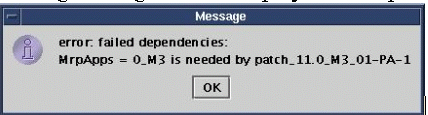
The Patch will verify proper software revision and conflict information before loading. If the software revision of the patch does not match the Applications revision, the following message will be displayed. The patch cannot be loaded.
Figure 4. Failed Dependencies Message
 note:
note:If there are conflicts between patches on the system, and patches to be loaded, the following message will be displayed.
Patch_tst_M4_01 = PA conflicts with patch_tst_M4_03-PA-1
This means that patch M4_01 (which is loaded on the system) must be deleted before you can load patch M4_03. See next section for patch removal, Patch Removal Process.
- After the patch load, perform getver and confirm the system version is latest by software matrix. Then, attach sticker with date and software version. For detail procedure, refer to Determining Service Pack Information on System.
4 Patch Removal Process
Procedure
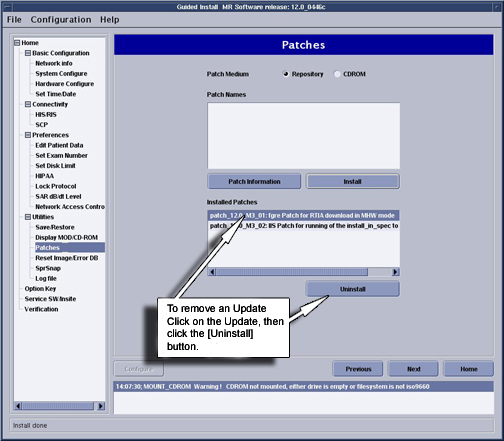
- Click on Installed Patches section of GUI
- Click on the specific patch that you want to remove. The patch will be highlighted.
- Click on Uninstall. The patch will then be removed. See Figure 5.
Figure 5. Removing Patches
- If there is a conflict which prevents a patch from being uninstalled,
the following message will appear. The conflict must be resolved
by possibly removing another patch.
Figure 6. Uninstall Error Popup

5 Finalization
Procedure
- Do a “Good bye” scan to insure proper scanner operation.
- Cleanup any material that was used during the Patch operations.