ICN Replacements
Prerequisites
Procedure
- Remove L Front Cover. Refer to SC Cover Removal.
- Remove Rear Cover (Magnet Room Side). Refer to SC Cover Removal .
- Remove Rear access cover.
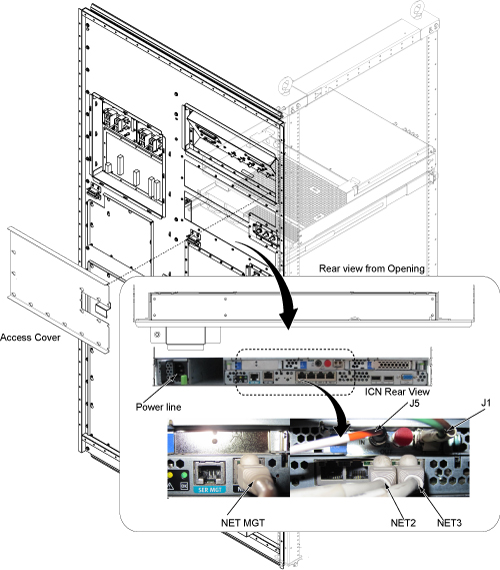
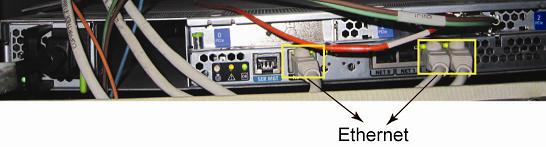
- Disconnect all of cables from the rear of the ICN.
Figure 1. ICN Cable Removal
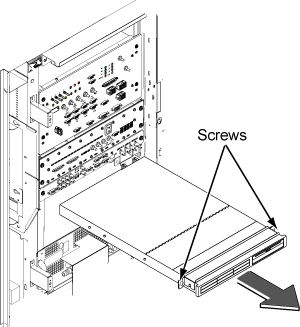
- Loosen two screws and slide the ICN out.
Figure 2. Slide the ICN out
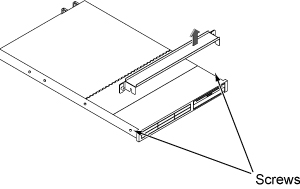
- Pull up and remove ICN bracket.
Figure 3. Remove Bracket
- Install ICN bracket to the new ICN.
- Insert new ICN into the Cabinet and fix by two screws.
- Connect all the cables back in a reverse operation and restore covers.
Finalization
- Restore the Power. Refer to System Cabinet PDU Main Breaker LOTO Procedure.
- Perform following procedure of VRE configuration. This procedure
will take between 25-30 minutes to complete.
- With the Signa up and running, go to the service desktop and push the [Guided Install] button on the toolbar. Then, Select "FE mode" and click [start]. A Cshell will open and ask for root password ("operator" < enter> is the default) The Install GUI will load and start.
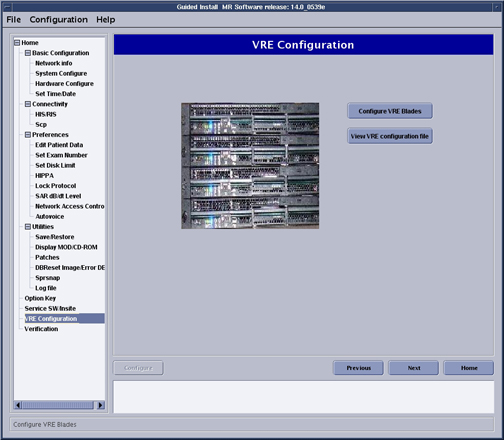
- Select "Configure VRE" and click on [Configure VRE Blades].
Figure 4. VRE Configuration
- When the Information window (shown in Figure 5) displays,
click [Continue] to confirm that the VRE Gigabit Switch Ethernet and
Host Ethernet connections (Figure 6) are complete and correct.
Figure 5. Confirm VRE Installation

Figure 6. VRE Gigabit Switch and Host Ethernet Connections
- When VRE configuration is complete, a configuration Success message is displayed. Click [OK] to continue.note:
ICN error log remains even though ICN is replaced.
ICN Monitor Display shows ICN sensor logs stored in '/usr/g/service/log/sensor_logs' directory.
('ICN Monitor Display' is shown from 'MR Service Desktop/Diagnostics/VRE Subsystems/ICN Monitor Display'.)
This log is not automatically removed after ICN is replaced.
As a result, you will see error log of previouse ICN even though it is replaced to the new ICN.
By performing the following procedure, the old log will be removed.
- Remove log stored in '/usr/g/service/log/sensor_logs' directory as follows.
- Open C Shell Window.
- Enter 'cd /usr/g/service/log'.
% cd /usr/g/service/log
- Enter '\cp -R sensor_logs sensor_logs.old' to make backup of old log file.
% \cp -R sensor_logs sensor_logs.old
- 4 . Enter as follows.
% su
(enter password)
- Enter 'cd /usr/g/service/log/sensor_logs'.
% cd /usr/g/service/log/sensor_logs
- Enter 'ls -l' and hit [Enter] to check the log files. (following is just example.)
% ls -l
-rw-r--r-- 1 root root 22680 Feb 7 15:01 12V
-rw-r--r-- 1 root root 24408 Feb 7 15:01 -12V
-rw-r--r-- 1 root root 21384 Feb 7 15:01 1.8V
-rw-r--r-- 1 root root 21384 Feb 7 15:01 3.3V
-rw-r--r-- 1 root root 20952 Feb 7 15:01 5V
-rw-r--r-- 1 root root 22032 Feb 7 15:01 Battery
-rw-r--r-- 1 root root 22896 Feb 7 15:01 CPU1
-rw-r--r-- 1 root root 22248 Feb 7 15:01 CPU1Core
-rw-r--r-- 1 root root 22248 Feb 7 15:01 CPU1DIMM
-rw-r--r-- 1 root root 22896 Feb 7 15:01 CPU2
-rw-r--r-- 1 root root 22248 Feb 7 15:01 CPU2Core
-rw-r--r-- 1 root root 22248 Feb 7 15:01 CPU2DIMM
-rw-r--r-- 1 root root 25488 Feb 7 15:01 FAN1
-rw-r--r-- 1 root root 25488 Feb 7 15:01 FAN2
-rw-r--r-- 1 root root 24840 Feb 7 15:01 FAN3
-rw-r--r-- 1 root root 24840 Feb 7 15:01 FAN4
-rw-r--r-- 1 root root 25704 Feb 7 15:01 FAN5
-rw-r--r-- 1 root root 19872 Feb 7 15:01 Intrusion
-rw-r--r-- 1 root root 20304 Feb 7 15:01 PowerSupply
-rw-r--r-- 1 root root 0 Jan 26 13:05 SEL
-rw-r--r-- 1 root root 23328 Feb 7 15:01 System
- Enter 'rm *' and hit [Enter] to remove all log files.
% rm *
- Enter as follows to exit from su.
% exit
- Log is collected every one hour. If you want to collect log
right after replacement of ICN, enter the following command.
- Enter as follows on C Shell Window.
% su
'enter password'
- Enter 'cd /export/home/signa/vre/diags'.
% cd /export/home/signa/vre/diags
- Enter as follows to collect log. It will take several seconds
to complete.
% sensors.pl
- Enter as follows to exit from su.
% exit
- Check log by ICN Monitor Display.
- Enter as follows on C Shell Window.
- Run one head or body scan.