Head, Body, or Head and Body System Gain Calibration
Prerequisites
Procedure
-
Follow the instructions in the first step if using a Split-Top Head Coil.
-
Proceed to Step 2 if using a Quad Head Coil.
- If using the Split-Top Head Coil, place the Head Coil into the
clinical position on the table and plug it in.
- Position the Head SNR Sphere into the head loader, and fasten the strap to the top of the loader to secure the sphere inside the loader.
- Place the Head SNR Sphere with the loader on the Head Coil Positioner
into the Head Coil as shown.
Figure 1. SNR Sphere on Head Loader Positioner in Head Coil
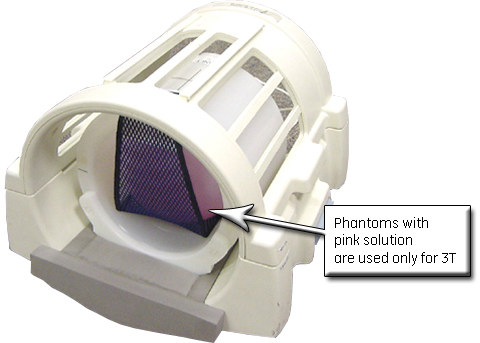 note:
note:Phantoms contain read green solution for 1.5T systems, and pink solution for 3.0T systems.
- Push the Head SNR Sphere, loader and positioner into Head Coil until the positioner end wing prevents further insertion.
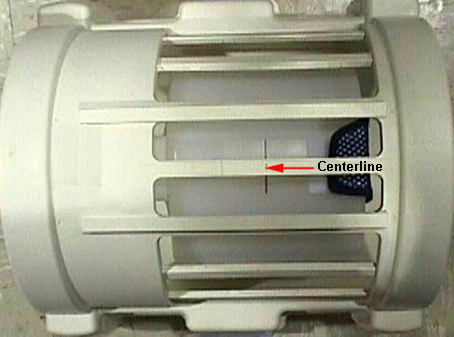
- Turn on the alignment lights, and LANDMARK on the black centerline line of the Head Loader shown below.
Figure 2. Landmarking on Centerline of Head SNR Sphere
- If using the Quad Head Coil, place the head coil in the clinical
position on the table and plug it in.
- Place DQA Phantom into the head coil.
- Push the DQA Phantom into the head coil until the phantom front flange prevents further insertion.
- Turn on the alignment lights and LANDMARK on the black centerline of the DQA Phantom.
- Place the Head SNR Sphere into the head loader, and fasten the strap to the top of the head loader to secure the sphere inside the loader.
- Without moving the table, remove the DQA Phantom, place the Head SNR Sphere with loader into the head coil so the laser is on the black centerline of the loader.
- If doing only Head System Gain:
- Advance to Scan.
- Proceed to Step 6.
- If using a nesting plate:
- Place the nesting plate on the table with the loader hole closer to the foot of the table.
- Push the nesting plate against the front of the head coil to
eliminate any gap.
Figure 3. Nesting Plate Setup
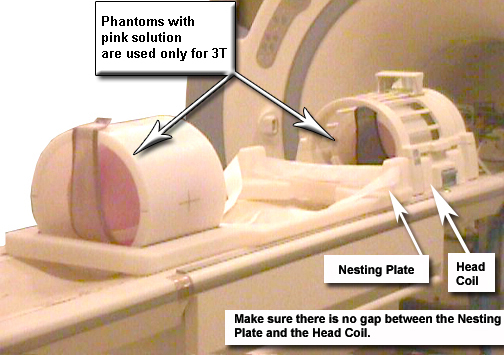
- Place the Body SNR Sphere with the loader into the nesting plate hole, and fasten in place with the strap.
- Advance to Scan.
- Proceed to Step 6.
- If not using the nesting plate:
- With landmark still set on the Head Loader, drive the table
in until the position reads 1135 mm.
Figure 4. Distance Between Head Coil Landmark and Centerline on Body Loader
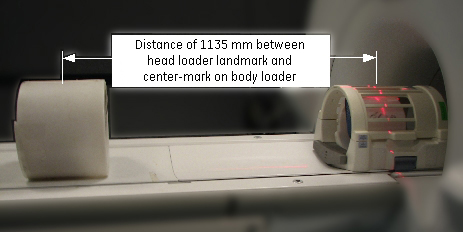
- Without moving the table, move the Body SNR Sphere with body loader so the laser is on the black centerline of the loader.
- Place the foam pads/wedges on both sides of the Body Loader to prevent roll.
- Advance to Scan.
- Proceed to Step 6.
- With landmark still set on the Head Loader, drive the table
in until the position reads 1135 mm.
- Start the System Gain Calibration tool.
To start non-proprietary service tools:
-
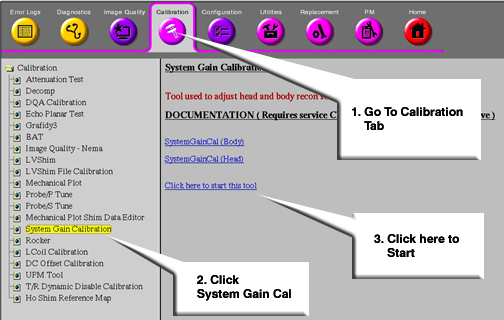
From the Common Service Desktop, select the Calibration icon.
-
Select System Gain Calibration from the calibration menu, then select Click here to start this tool.
Figure 5. Starting System Gain Calibration
 note:
note:If running System Gain after initial software load, the system will prompt for the proper nesting plate. Type 1 for the short nesting plate or 2 for the long nesting plate. If the nesting plate type is incorrect, manually delete the nesting plate file and run System Gain again. The nesting plate file is located at: /w/config/spt_nesting.
-
- After the tool starts, type: 2 and press Enter to select Auto Mode, then depending on the previous
setup:
- Type: 1 and press Enter for Head Mode.
- Type: 2 and press Enter for Body Mode.
- Type: 3 and press Enter for Both Head and Body Mode.
- Wait for the calibration to complete with the results.
-
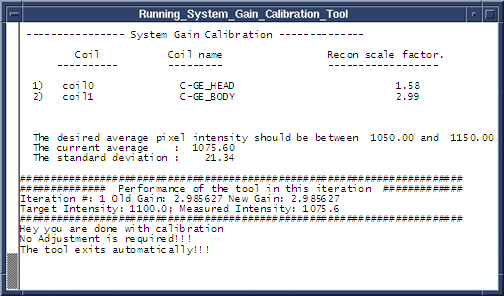
If no adjustment is required and the calibration was successful, the screen shown below displays.
-
If adjustments are required, Do you want to save the recon scale factor displays. Type y.
Figure 6. Calibration Output
-
- Type 4 to exit the tool.
This procedure is for Head, Body and both Head and Body System Gain calibration.
Finalization
- Perform separate check scans using coils for which System Gain (i.e. Head or Body or both) has just been run to ensure proper system operation.
- Remove all phantom(s), loader(s), positioner, head coil, pads and nesting plate (if used) from the bore and table.