Grafidy - Select previous calibration parameters
The image below shows a summary of the relationship between the calibration parameter values and iterations performed.
Figure 1. Scan iteration relationships
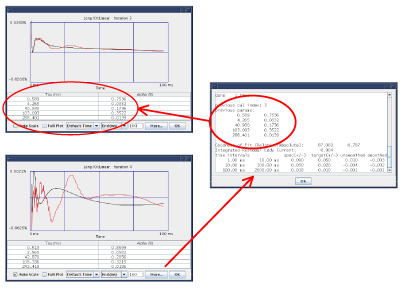
In the example image above, fitting data collected in the third iteration generated the circled calibration values. When accepted (as was the case here), these calibration values went into the calibration file (grafidy.cal) as well as the associated files that are downloaded to the hardware (grad_ecc_coeff.dat and b0_ecc_coeff.dat). These values were then used in the next (fourth) iteration. To verify this, the More button was selected when displaying the data from the fourth iteration. The calibration values used to collect the data are listed under “previous parameters”. As shown here, the value of “previous cal index” is 3 showing that the calibration values used were generated by the 3rd iteration and the values are the same as the values listed as the best-fit parameters in the 3rd iteration data display.
With this relationship in mind, there may be times when selecting the calibration values from previous iterations is desirable. See Using cal values from previous iteration or Using initial cal values for two methods to accomplish this.
Procedure
-
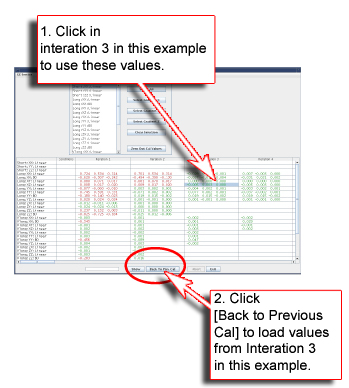
Using the method shown loads the calibration values used to collect the data shown for the selected iteration (3rd iteration in this example) to the calibration files. Most of the time these are the parameters obtained from the fit of the data collected in the previous iteration.
- Using cal values from previous iteration - Using the method shown loads the calibration values used to collect the data shown for the selected iteration (3rd iteration in this example) to the calibration files. Most of the time these are the parameters obtained from the fit of the data collected in the previous iteration.
Figure 2. Using cal values from previous iteration
- Using initial cal values - If one of the Conditions cells is highlighted and the Use Post-Fit Cal Parameters for Selected Cell menu item is selected, then the calibration parameter values that were on the system when the Grafidy 3 tool was started will be restored for that associated eddy current component.
For example, the image below shows the output of selecting the Show button with a Conditions cell highlighted. With this same cell highlighted, if the Use Post-Fit Cal Parameters for Selected Cell menu item is selected, the parameter values listed in the initial params section are restored for that component.
Figure 3. Initial calibration values
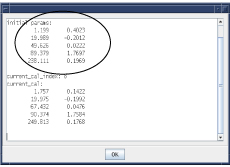
Selecting the Show button with the same cell selected after this process has been followed will show the same parameter values in current cal section as in the initial params section and the current cal index value will be 0.
- Use Default Short Cal Params - If a Conditions cell associated with the short mode (short XX, YY, ZZ linear) is selected with the menu item Use Default Short Cal Params also selected, the tool will load the default short calibration parameter values for the selected component (short XX linear, for example) into the calibration files.