Gradient LVShim
Prerequisites
The goal of Gradient LVshim is to improve the shim over a 45-cm (Whole, BRM), 40-cm (ZOOM, CRM) DSV using gradients only.
1 Phantom Setup
Procedure
- Remove the Head Coil from the cradle and any phantoms that may be there.
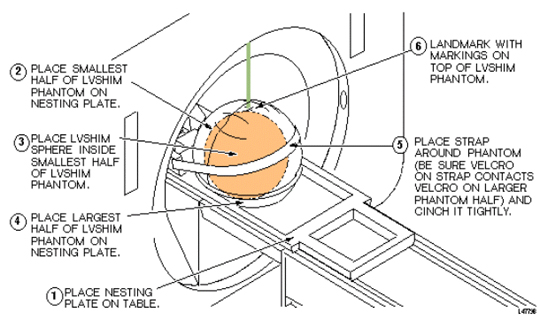
- Setup and align the LVShim Phantom per Figure 1.
Figure 1. Aligning LVShim Phantom on Patient Table
- Press Advance to Scan button.
2 Gradient LVShim Scan Prescription
Procedure
- At the Host Computer, prepare the system for scan using the LVShim Scan Protocol.
- Click Auto Prescan. Make sure TG is between 130 and 160. Record Gradient Shim current value. If auto prescan fails, proceed to Step 3, (Manual Prescan). Otherwise skip down to Step 5.
-
Click Manual Prescan
-
While in the Center Freq. Fine (CFH) mode, verify that the frequency peak is centered in the display. Center frequency peak as necessary. After locating the best signal, open the Frequency menu at the top of Manual Prescan window and select Save Frequency to save the new center frequency.
-
Click Transmit Gain (TG), open the Markers menu at the top of the Manual Prescan and select Horizontal Hairline. Adjust Transmit Gain for the highest value. TG should be between 130 to 160.
note:The TG needs to be adjusted correctly after performing Auto Prescan. Auto Prescan sets the TG for this phantom too high which results in the RF being over driven and will produce NaN (Not a Number) in the LVShim analysis. Typically the TG will maximize at approximately 20 counts less than the Auto Prescan setting when adjusted in Manual Prescan.
-
Click Scan TR (R1/R2). Verify that R1 and R2 are not over ranged. Adjust R1 and R2 for approximately 50%.
-
- Click Done to exit Manual Prescan.
- When finished with manual prescan, click Scan.note:
The annotation on the LVShim images is not correct and does not change. The scan plane is driven by the LVShim PSD, not through scan prescription. Therefore, the software that is responsible for the image annotation doesn't know about the plane changes and keeps the annotation at the first plane. The images are in the correct plane and orientation; however, the annotation does not reflect this.
3 Gradient LVShim Analysis
Procedure
- At the Host Computer, go to the Service Desktop and open the Service Browser, if it's not already running.
- Start the LVShim tool as shown in Figure 2.
Figure 2. Starting LVShim Tool
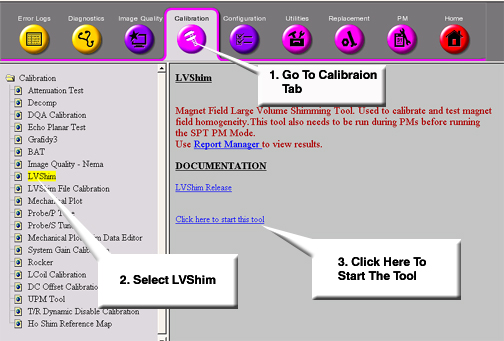
- For TwinSpeed, highlight WHOLE or ZOOM matching the coil currently being shimmed.
- The LVShim tool will started as shown in Figure 3.
Figure 3. LVShim Main Menu
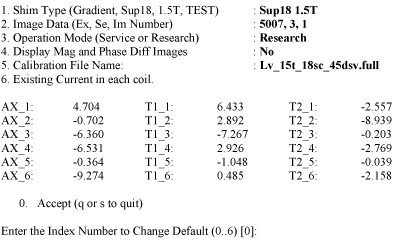
- Change the following parts to calculate the next set of currents while
performing Main LV Shim:
- Shim Type should be set to Gradient . Type 1 Enter until the correct set is displayed.
- Image Data should show the Exam, Series and the first Image number of the previously scanned LV Shim series. Type 2 Enter and change if necessary.
- Operation Mode should be set to Service. Type 3 Enter until this is listed correctly.
- Display Mag and Phase Diff Images should be set to No. Type 4 Enter until this is listed correctly.
- The calibration file should list the correct configuration file to use. Type 5 Enter to view possible filed. You can view detailed information on these files in the LV Shim Software document. Make sure the correct gradient mode is chosen if this system is a TwinSpeed.
- The existing grad shim in each coil should match the grad shim set in each coil from the previous iteration (or the initial currents). Type 6Enter and modify the currents if necessary.
- Once the LVShim Analysis tool is setup correctly via Step 5, type 0Enter to run the analysis.
- If image phase wrap was detected, the following message appears: “Excessive phase wrapping….Please re-scan at Wider Bandwidth or smaller test diameter”. If this occurs, return to Gradient LVShim Scan Prescription and rescan and a greater bandwidth.
- The output should open in a c-shell. See Figure 4 for an example. (Bandwidth, Exam, Series and Image # will
match the LV Shim series under analysis):
Figure 4. Example Output
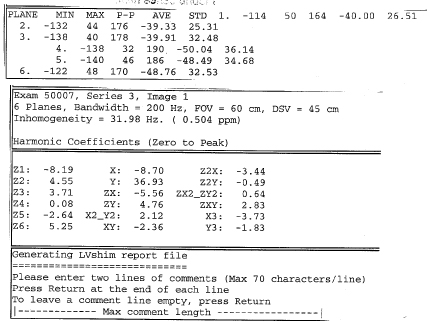
- If “NaN” is displayed in the Harmonic Coefficient data, you should return to Gradient LVShim Scan Prescription and rescan. Make sure the TG value is between 130 and 160.
- Enter Comments as desired. Once comments are entered, the following
is displayed :
Coil Existing Delta New
X 1 -1 0
Y 0 0 0
Z 3 1 4
- Record this data in the appropriate Data Sheet.
- Compare this data to the appropriate LV Shim Specifications for your
magnet, see CRM
TRMZM (Zoom) or BRM TRMWB (Whole Body). Keep
iterating until no noticeable shim improvement is seen.
- If you accept the new grad shim values, type YEnter and return to Gradient LVShim Scan Prescription and rescan, the new currents are automatically entered into the gradient amplifiers by the software. Update the Data Sheets.
4 Finalization
Procedure
- Remove any phantoms and or tool used during LVShim.
- Do a TPS Reset.
- Do a head or body test scan before customer turn over.