Geometry Verification-Software Configuration Check
Prerequisites
The system configuration values for the Setting on the x-, y-, and z-gradient to obtain 1 gauss/cm (also known as cfxfull, cfyfull, and cfzfull, respectively) should be either all positive, or all negative, depending on which direction the magnetic field is ramped-up. If the magnet was ramped with the B0 field going into the magnet (usual case for 1.0T, 1.5T and 3.0T systems), the cfxfull, cfyfull, and cfzfull values in the configuration file must be positive in order for the geometry to come out right.
Procedure
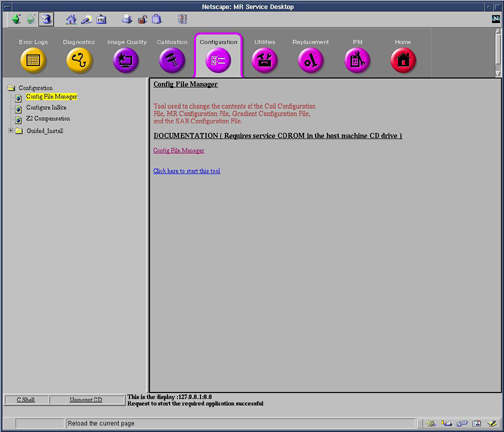
- From the Common Service Desktop, Select Configuration, Config File Manager and launch the tool.
See Figure 1
Figure 1. Opening Config File Manager From Service Desktop
- On the Config File Manager main screen, Click the Gradient Config button on the left.
- Verify that all three gradient values are the same sign (all positive or all negative).
- Next, a Save dialog box appears for each configuration file that has changed. To save changes click the Save button. To not save changes click the Discard Changes button.
- ClickQuit and click Yes in the dialog box question, “Do you really want to save changes and quit ?”
Finalization
- Exit Configuration File Manager