A check scan is done at the conclusion of many procedures. This functional check assures the unit is in good clinical working order.
Prerequisites
|
- Depending on site configuration and/or rules, you may want to temporarily disable Auto Archive or Auto Network.
|
Procedure
- Landmark on the center line of the phantom. The laser must be in the middle of the line. Press Advance to Scan.
- Click Save.
- Enter the following image parameters.
Figure 1. Image parameters
| Option |
Description |
|---|
| Frequency field of view (FOV) (Freq. FOV) |
30.0 |
|---|
| Phase FOV |
1.00 |
|---|
| Slice Thickness |
5.0 |
|---|
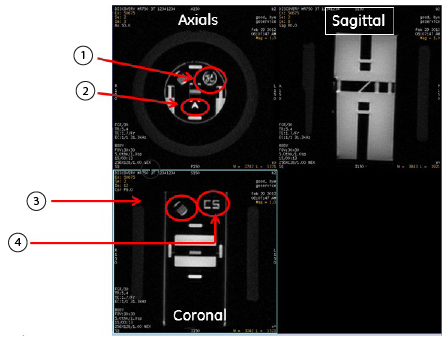
- Review the images to confirm that the orientation is correct.
Figure 2. Check scan image orientation