Dock Hook
Prerequisites
Procedure
- Undock patient transport, and move from exam room.
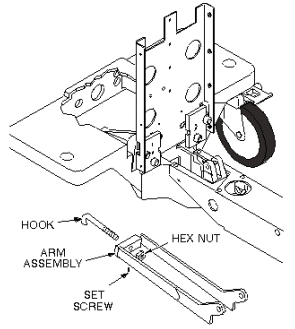
- Loosen set screw under arm assembly (see Figure 1).
- Remove hex jam nut from the hook and then unscrew hook from
the arm assembly (see Figure 1).
Figure 1. PATIENT TABLE DOCK HOOK
- Install new dock hook, but do not lock down until adjustment is complete.
- Move patient transport into exam room.note:
EQUIPMENT DAMAGE POSSIBILITY! IF THE DOCK HOOK IS ADJUSTED TOO TIGHTLY, AND AN ATTEMPT IS MADE TO DOCK THE TABLE, SEVERE EQUIPMENT DAMAGE CAN OCCUR. IF IT APPEARS TO TAKE AN EXCESSIVE AMOUNT OF FORCE TO PRESS THE DOCK PEDAL, DO NOT FORCE IT; LOOSEN THE DOCK HOOK FIRST.
- Perform Dock Hook Tension Adjust.
1 Finalization
Procedure
- Verify that stepping force of the Table dock pedal is appropriate. (not too hard and not too soft).
- Verify that Table can dock and undock smoothly.
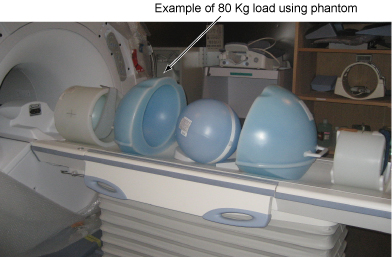
- Place the 80Kg Load evenly on the Cradle. If using the phantom, refer to the following illustration.
Figure 2. 80Kg Load
- Verify that Table moves up and down fully and smoothly using the pedal of Table.
- Verify that Table moves up and down fully and smoothly using the pedal of Dock.
- Verify that Cradle moves in and out fully and smoothly.
- Verify that all of the parts and the screws are installed.
- Verify that there is no wound or dirt on the Table, Cradle, Pad, and Patient Strap.