Determining the Software Revision for Linux
Prerequisites
Overview
There are two different methods for acquiring the software revision. Whichever method you use, enter the command sw_config_status and press Enter.
1 Using the Common Service Desktop
Procedure
- From the Service page, start the Service Browser.
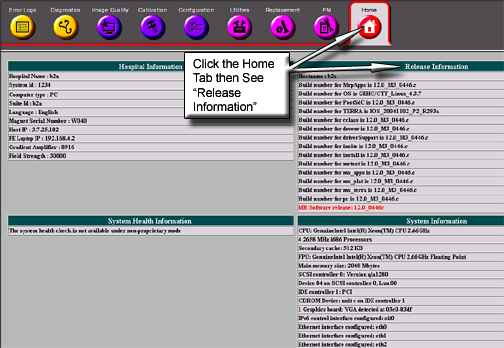
- Verify that the Home tab is selected.
- For Release and software revision information, see Figure 1.
Figure 1. Common Service Desktop Home Screen
2 Using a C-Shell
Procedure
- From the Service Desktop Manager, click on C-Shell to open an xterm.
- Locate the cursor in the window.
- To see the software revisions used on your system, at the prompt,
type sw_config_status and press Enter.
sw_config_status [Enter]
Finalization
No finalization steps.