Cradle Motion Test
Prerequisites
This test moves the cradle into the magnet bore, and then returns it to its starting position. When this test is run, the cradle is automatically moved into the magnet bore a maximum distance of 600 mm, then is returned to its starting position. Any error messages generated during this test are stored in the Error Message Log. If the cradle starts in the Home position, it is moved about 100 mm into the magnet bore, is paused there, then is advanced a maximum of 600 mm into the bore, then is returned close to the 100 mm position. If the cradle starts in a position beyond 1700 mm into the bore (max. Is 1160 for LCC), it is automatically returned to the Home position, then is advanced a maximum of 600 mm into the bore, then is returned close to the 100 mm position.
Procedure
- Start the Service Browser and go to the MR Service Desktop on the host computer.
- Go to the Diagnostics tab, Hardware Location, Magnet Room, SRI Functional Tests, and select the Motion Test. See Figure 1.
Figure 1. SRI Functional Tests
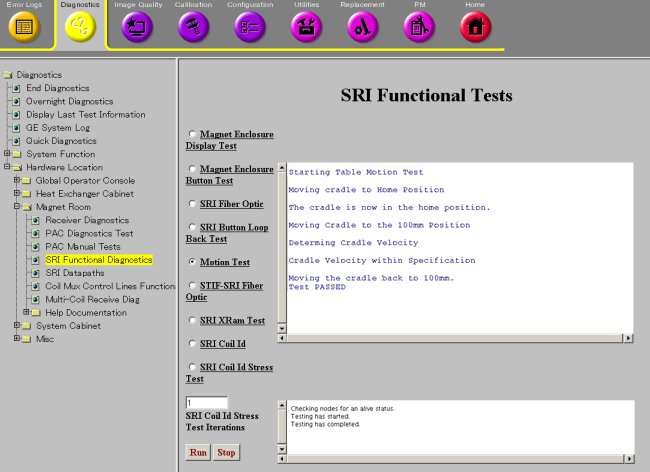
- Select Motion Test and then click Run.
- A pop-up window will appear warning that the table is about to move. Press Yes to continue.
- Verify that the cradle moves smoothly, and that magnet enclosure cradle position display increments, or decrements, corresponding to cradle travel into or out of magnet bore.
- After the cradle stops, verify the test passed in the status window of the diagnostic tool.
- Go to Diagnostics, End Diagnostics and select the End Diagnostics Button to exit the diagnostics mode.
Finalization
No finalization steps.