Running Overnight Diagnostics
1 Diagnostic Link
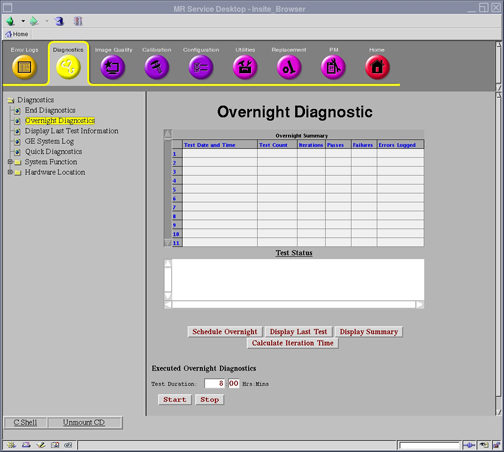
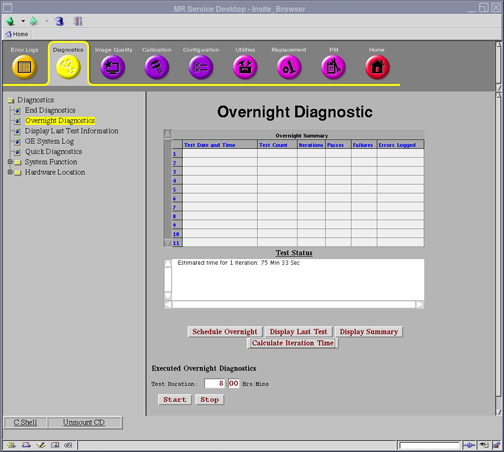
Diagnostics >> Overnight Diagnostics
Figure 1. Overnight Diagnostics
2 Purpose
The purpose of Overnight Diagnostics is to run batch testing during off-peak times.
3 Components Tested
The following Pass/Fail tests will be performed whenever Overnight Diagnostics are run.
-
Host-ICN(x) Ethernet Path
-
Host-ICN(x) Ethernet Stress
-
Host-ICN(x) IPMI Path
-
Host-ICN(x) Remote Shell
-
ICN(x) Infiniband Connectivity
-
ICN(x) Infiniband Stress
-
ICN(x) CPU Stress
-
ICN(x) Hard Disk Health
-
ICN(x) Hard Disk Stress
-
ICN(x) Hard Disk Integrity
-
ICN(x) VRF Board Level Diagnostics
-
ICN(x) VRF->ICN Fast Feedback Path
-
ICN(x) RRX->VRF Datapath
-
ICN(x) VRF->ICN Fast Feedback Path
-
ICN(x) RRX->VRF Datapath
-
Keyboard Audio Test
-
Keyboard Loop Test
-
Keyboard SCP Loop Test
-
PAC Power Up
-
PAC Resp.
-
SPU ->PAC DP
-
SPU->CFB DP
-
Spectro RF Amp I/F
-
RF Amp Interface
-
RF Calib
-
DTX -> RRX DP
-
TNS DP
-
SRF->RRX+DTX DP
-
SCP->CAN DP
-
Peak Forward Power Overload Circuit Test
-
Peak Forward Power Measurement Circuit Test
-
Junction Temperature Overload Circuit Test
-
Junction Temperature Measurement Circuit Test
-
Peak Reflected Power Overload Circuit Test
-
Peak Reflected Power Measurement Circuit Test
-
Average Forward Power Measurement Circuit Test
-
Average Reflected Power Measurement Circuit Test
-
SRF Board Level Diagnostics
-
SRF->IRF DP
-
IRF3 Board Level Diagnostics
-
DTX Board Level Diagnostics
-
RRX Board Level Diagnostics
-
SRF->TRF DP
-
PHPS Board Level Diagnostics
-
CFB Board Level Diagnostics
-
SRI Board Level Diagnostics
-
SRI MCPDB Datapath
-
SRI - CFB Loopback
-
TRF Board Level Diagnostics
-
Cooling Cabinet Data Path Diag
-
RF Hub Board Level Diagnostic
-
RF Hub Shutdown Diagnostic
-
RF Hub - Receiver Datapath Diagnostic
-
RF Hub Reset Diagnostic
-
Receiver Reset Diagnostic
-
RF Hub CAN Fiber Loopback Diagnostic
The system will automatically determine which of the above tests are available and skip any tests that do not apply.
4 Requirements
No special requirements.
5 Test Sequence
-
From Common Service Desktop, select Diagnostics menu, then select Overnight Diagnostics.
-
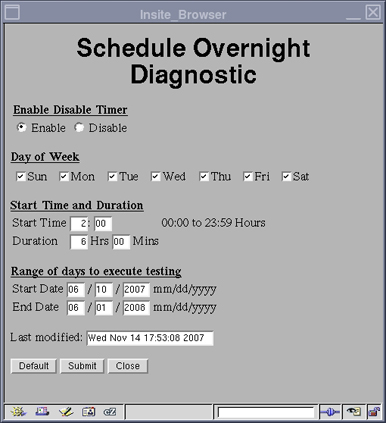
Fill in the necessary information on the GUI for running overnight diagnostics, then select SubmitFigure 2.
-
Select Close. The overnight diagnostics will run at the appointed time.
Figure 2. Schedule Overnight Diagnostic
-
-
Other options available are:
-
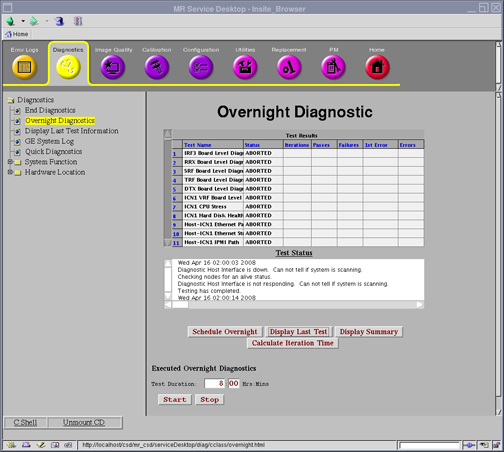
Display Last Test displays the last diagnostic run as shown in Figure 3.
Figure 3. Display Last Test
-
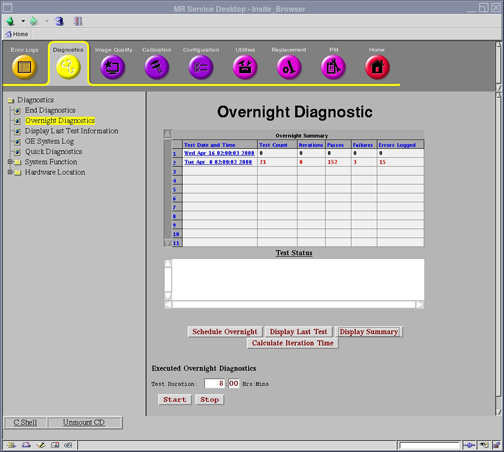
Display Summary brings up a summary of diagnostics run as shown in Figure 4.
Figure 4. Display Summary
-
Calculate Iteration Time analyzes how long the overnight diagnostics will take to run as shown in Figure 5.
Figure 5. Calculate Iteration Time
-
6 Expected Results
The diagnostic will either pass or fail as displayed in the Overnight Summary. Follow error messages for subsequent actions if necessary.