IXG Board Level Diagnostic
1 Disclaimer
Depending on your service agreement, not all service tools, diagnostics, and utilities referenced in this document may be accessible. Contact your sales person for information on available service license packages.
2 Diagnostic Description
2.1 Diagnostic Path
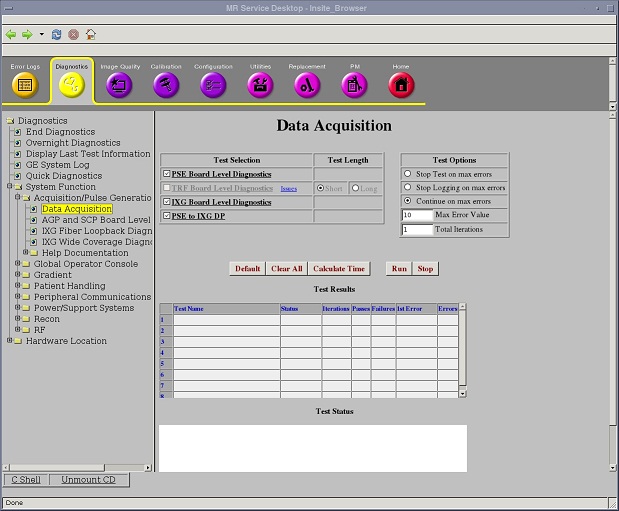
Diagnostics > System Function > Acquisition/Pulse Generation > Data Acquisition
Diagnostics > Hardware Location > System Cabinet > CAM > Data Acquisition
Figure 1. IXG Board Level Diagnostic
2.2 Purpose
The IXG Board Level Diagnostic tests the circuitry internal to the IXG board.
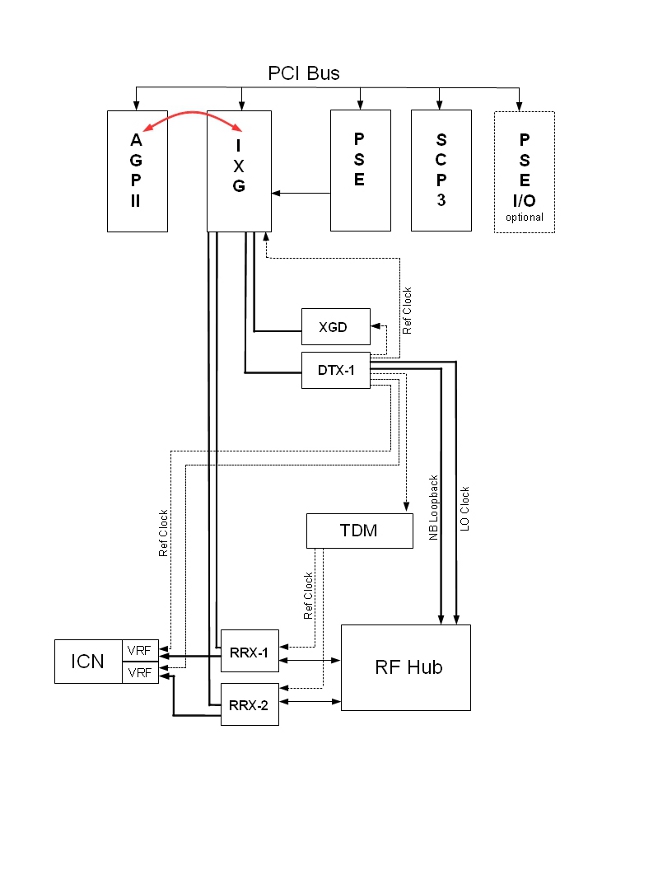
The IXG board has two sections. One section provides DVMR link communications, and the other section communicates with XG2 power supplies and amplifiers.
The test is run from the AGP board that accesses the IXG board over the cPCI bus.
2.3 Components Tested
The entire board is tested, except the upper six fiber connectors (the section of the board used for communication to XG2 components).
2.4 Requirements
-
Applications must be loaded.
-
The IXG and AGP boards must be in the chassis. Other connections to the IXG board are optional (the test affects only the IXG board).
-
If the power has been cycled, a TPS reset is required. The TPS reset does not need to be successful.
2.5 Block Diagrams
If the system has the MNS option, the PCI bus may include an ERF board. In this configuration, RRX-1 and RRX-2 connect through the ERF board instead of the IXG board. The data acquisition for this diagnostic test performs the same for all configurations.
Figure 2. IXG Block Diagram (without MNS Option)
2.6 Test Sequence
-
Select IXG Board Level Diagnostics.
-
Click Run.
-
Review the Test Results table to see if the diagnostic passed or failed.
2.7 Expected Results
- Test Results
-
Diagnostic results display the test name with a status of PASS or FAIL. If you receive a FAIL status, click the error number in the 1st Error column to view error message details.
- Test Status
-
This window informs you of the progress of the test from the initial scan to the completed diagnostic.
2.8 Finalization
Before scanning, perform a TPS reset.