Keyboard Loop Test
1 Diagnostic Link
Diagnostics>>System Function>>Global Operator Console>>Keyboard Datapaths
Diagnostics>>Hardware Location>>Global Operator Console>>Keyboard Datapaths
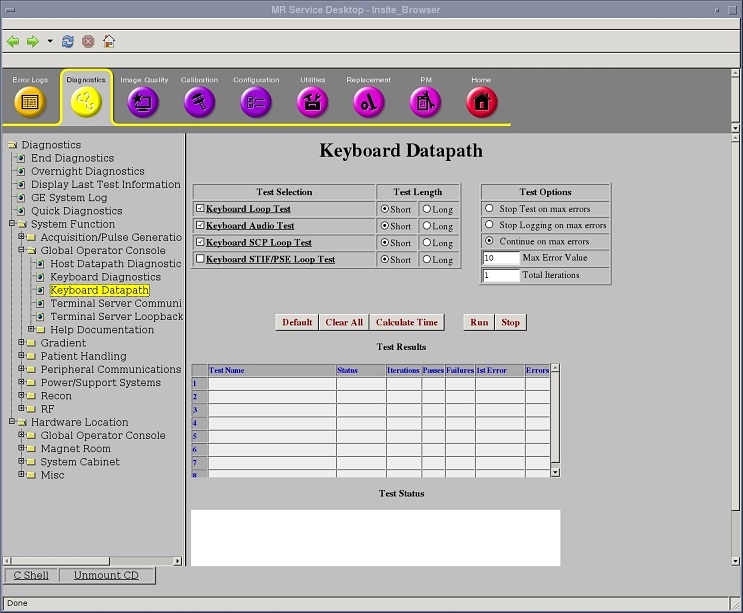
Figure 1. Keyboard Datapaths
2 Purpose
This test runs a loop between the SCP and the keyboard processor.
Short vs. Long Tests: The short test performs a walking ones and walking zeroes pattern whereas the long test will perform a walking ones, walking zeroes, 0xaaaa, 0x5555, and possibly other patterns. As a result, selecting the long test generally provides a longer and more exhaustive test. If the problem is highly intermittent then you may want to run a long test.
Click Calculate Time to get an estimate of the time it takes to run the diagnostic.
3 Components Tested
 |
|
4 Requirements
None
5 Test Sequence
The SCP requests the button status from the keyboard and checks the response to ensure that it is equal to zero. If any other value is received, the test fails.
Do not change the Test Options settings from the default settings unless instructed to do so by a GE Healthcare engineer. There are very few circumstances when these settings need to be changed.
6 Expected Results
Output values pass or fail. In the event of failure, the details of the failure can be found in the GE System Log.
If this test fails, it is possible that the SCP board is defective.
Although, in the case of errors you can click the 1st Error number to see the nature of the error, it is recommended that you view the GE System Log to view all the errors that were recorded.