Environmental Checks
1 Environmental Monitor Check
Environmental monitor data includes Temperature and Humidity monitoring of the GOC and the equipment room. This environmental monitor data does not monitor magnet room temperature and humidity.
Environmental monitor data is useful for site trending and will be remotely collected as a part of the prognostic data collection process, so it is critical to confirm that it is functioning properly.
-
Install the Service Key
-
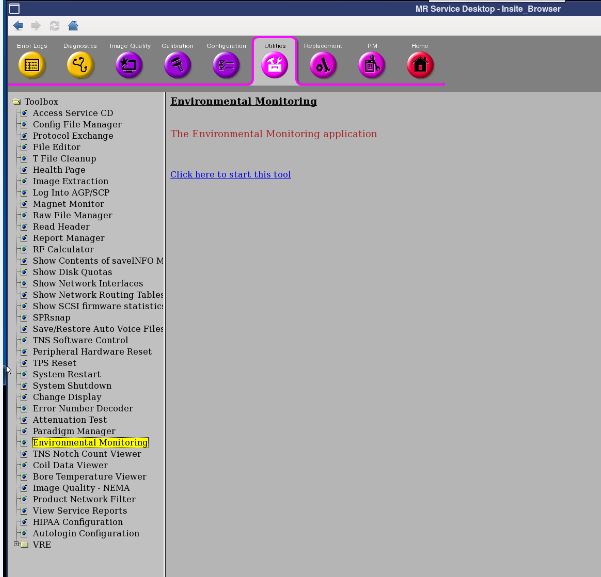
Open the Common Service Desktop and select . See Illustration below.
Figure 1. Environment Monitor check via CSD
-
Select .
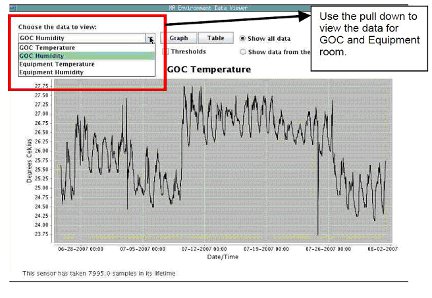
note:This utility displays the temperatures and humidity of the Operator's Console and the Equipment room. It keeps track of the data that is stored daily. The data is sampled at 30-minute intervals but is only downloaded to this utility once a day. The downloaded data can then be compared against the siting limits through this utility. The utility allows you to graph or view each data point numerically and will provide a maximum, minimum, and mean for the date range selected.
Figure 2. MR Environment Data Viewer
-
View the output similar to the one shown in Illustration 2. From the drop-down menu under "Choose data to view" you can select GOC temperature, GOC humidity, Equipment Room Temperature, or Equipment Room Humidity. Date and time are also displayed.
-
Confirm that each of the pull-downs displays data plot variations similar to that shown in Illustration 2. Any plots that are a flat line indicate a sensor that is not being read. Troubleshoot any plots exhibiting a trailing flat line.
-
The current Troubleshooting document can be found on the Service Methods DVD for Signa HDx under
Troubleshooting → System → Environmental Sensors Troubleshooting
2 System Environmental Data
For system Environmental data refer to the appropriate HDx Pre-Installation Document. Refer to the Site Environment tab.