Turn on or restart the computer. Press F2 to enter the BIOS Setup menu.
Note: Optionally, press F12, then select the BIOS Setup menu.
In the Settings pane, expand the General menu.
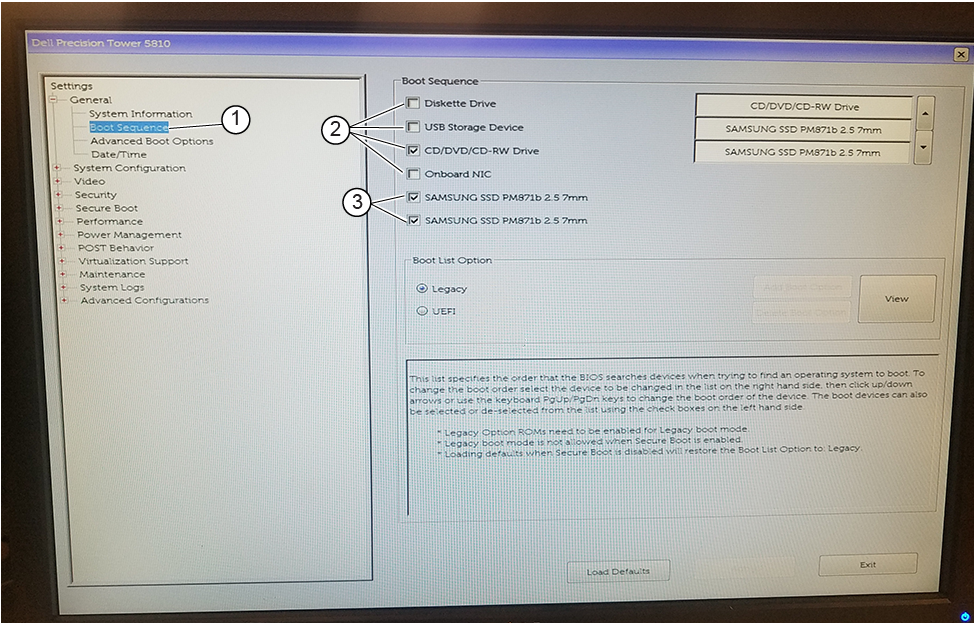
Figure 1. Boot sequence setup
1
Boot sequence
2
Clear, if checked
3
Select, if not checked
Select the Boot Sequence option.
In the Boot Sequence pane, if checked, clear the following:
Diskette Drive
USB Storage Device
CD/DVD/CD-RW Drive
Onboard NIC
Note: OS media will not be detected when USB Storage Device and CD/DVD/CD-RW Drive are disabled. Using the steps in this procedure, re-enable USB Storage Device and/or CD/DVD/CD-RW Drive as an external boot device prior to using the OS media.
In the Boot Sequence pane, if not checked, select: both SAMSUNG SSD options.
At the bottom of the screen, click Apply, then click Exit to save changes and exit BIOS.