
- Optima MR450w BASE 1.5T System Service Methods
- 5690012-2EN Revision 3
- 00000018WIA30F4FD20GYZ
- id_131072555.0
- Feb 21, 2021 9:14:11 PM
1.5T Head Neck Spine (HNS) Coil Cable Replacement
Prerequisites
| Required persons | Preliminary requirements | Procedure | Finalization |
|---|---|---|---|
| 1 | Not Applicable | 40 minutes | Not Applicable |
| Item | Quantity | Effectivity | Part number | Manufacturer |
|---|---|---|---|---|
| Standard tool kit – Flathead screwdriver and pliers | 1 | - | - | - |
| Item | Quantity | Effectivity | Part number | Manufacturer |
|---|---|---|---|---|
| Output Cable-Hypertronics (8-Channel “B” connector) for the Head Neck section with the Coil ID Board | 1 | HNS Rev. 2 Upgrade with the Coil ID Board |
2417356 | - |
| Output Cable-bendix without the Coil ID Board. | 1 | HNS Rev. 2 Upgrade without the Coil ID Board |
2417357 | - |
| Output Cable (16-Channel “B” connector) for the Head Neck Section with Coil ID Board. | 1 | HNS Rev. 2 Forward Production with Coil ID Board |
2417359 | - |
| TL Unit Cable | 1 | HNS Rev. 2 without the Coil ID Board |
2417358 | - |
| 8-CHANNEL HNS EXC III UPGRD SYS CABLE FRU | 1 | HNS Rev. 3 Upgrade with the Coil ID Board |
2423319 | - |
| 8-CHANNEL HNS EXC II SYS CABLE FRU | 1 | HNS Rev. 3 Upgrade without the coil ID Board |
2423317 | - |
| 16-CHANNEL EXC III HNS FWD PRD SYS CBL FRU | 1 | HNS Rev. 3 Forward Production with Coil ID Board |
2423320 | - |
| HNS TL UNIT CABLE FRU | 1 | HNS Rev. 3 without the Coil ID Board |
2423318 | - |
| 16-Channel P-connector HNS Discovery System Cable FRU | 1 | HNS P-connector Discovery with Coil ID Board |
2424269 | - |
About this task
Follow this process to change the system cable for coils that have a cable available as a spare part. This process will be the same whether replacing the coil or the cable.
HNS Rev. 2
Procedure
Notice 
Put an ESD wrist strap on and ground.Notice Figure 1. ESD Wrist Strap On 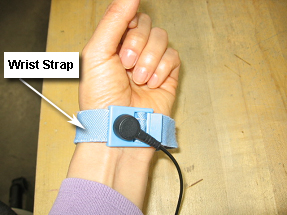
- Unscrew the cable clamp from the coil as shown in Figure 2. Retain the original
screws used.
Figure 2. Removing the Cable Clamp 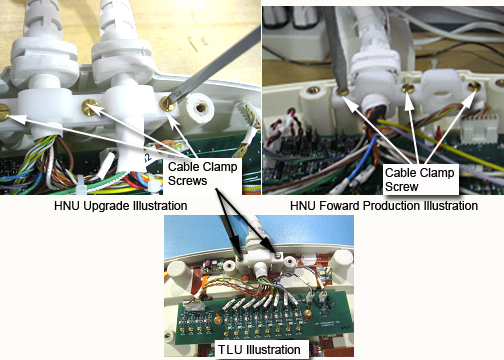
- Identify and remove RF connectors (CH in Head Neck Unit (HNU), J in Thoracic Lumbar Unit (TLU)) from interface Board, see Figure 3. Pliers may be
necessary for removal of the MMCX connectors, as they may be difficult
to unplug. This will help prevent accidental breakage of the cables.
Figure 3. RF Connectors in the HNU 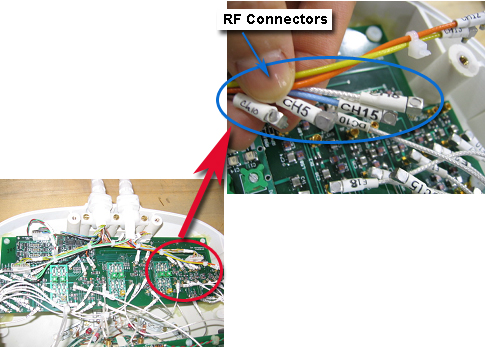
Figure 4. Using Pliers for Removal of Connectors 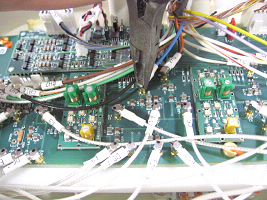
Figure 5. RF Connectors for the Thoracic Lumbar Unit 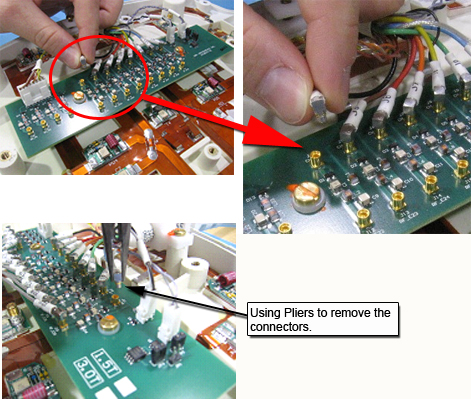
- Identify and remove DC connectors (DC) from Interface Board
and Coil ID PCB. See Figure 6 through Figure 8.
Figure 6. DC Connectors: Forward Production Coil (1 System Cable) Head Neck Unit (HNU) 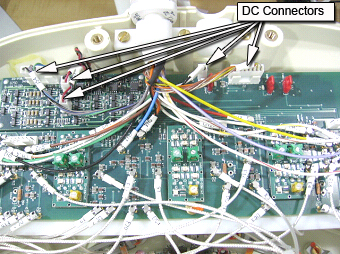
Figure 7. DC Connectors: HNU Illustration (2 System Cables) (Upgrade Specific) 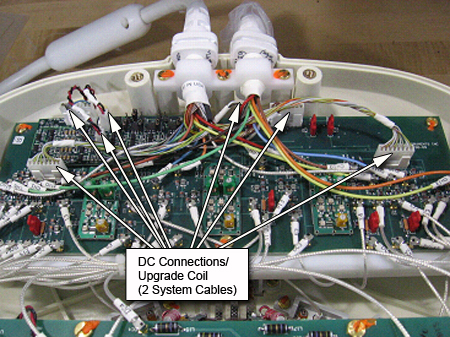
Figure 8. DC Connections: TLU 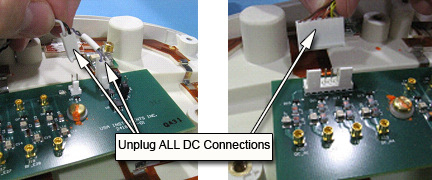
- Identify the Interface Board Assembly and the coil ID PCB located
on the Interface Board (Head Neck Unit (HNU) Only). Carefully remove the Coil ID assembly.
See Figure 9.
Figure 9. Interface Board and Coil ID PCB Locations 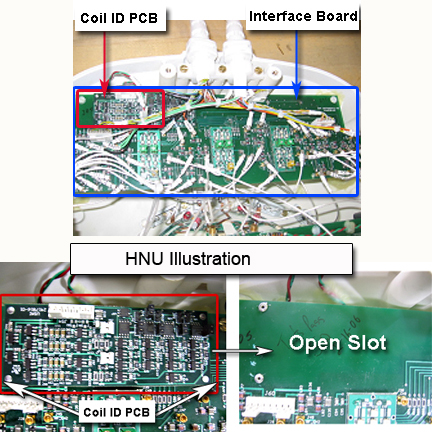
HNS Rev. 3 HDx, Discovery MR450, and Optima MR450w Systems
Procedure
Notice
Put an ESD wrist strap on and ground.Notice Figure 10. ESD Wrist Strap On - Unscrew the cable clamp from the coil as shown in Figure 11. Retain the
original screws used.Note:
When re-installing components, tighten all screws snugly, but do not over-tighten. The recommended torque is 10 in-lbs for M4 screws and 15 in-lbs for M5 screws.
Figure 11. Removing the Cable Clamp 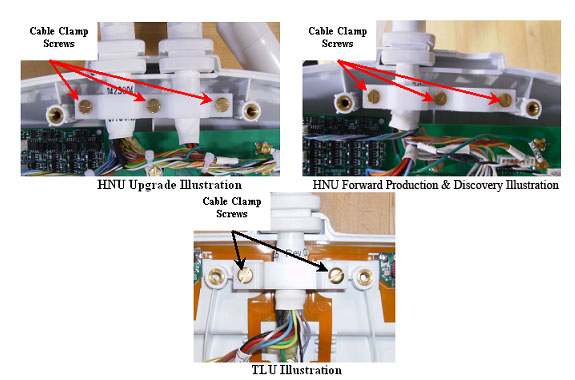
- Identify and remove ganged RF connectors from interface Board.
See Figure 12.
Figure 12. RF Connectors in the HNU 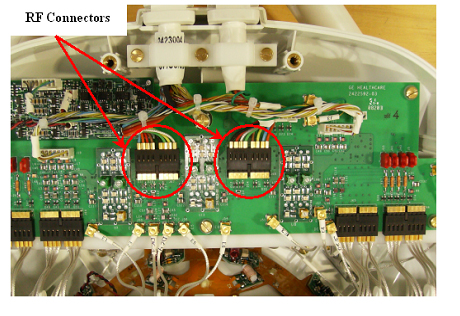
Figure 13. RF Connectors for the Thoracic Lumbar Unit 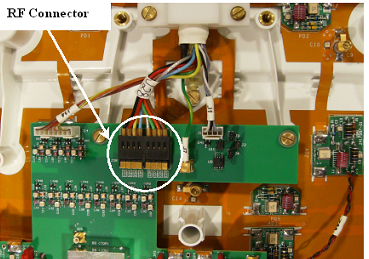
- Identify and remove DC connectors (DC) from Interface Board
and Coil ID PCB. See Figure 14 through Figure 16.
Figure 14. DC Connectors: Discovery and Forward Production Coil (1 System Cable) HNU 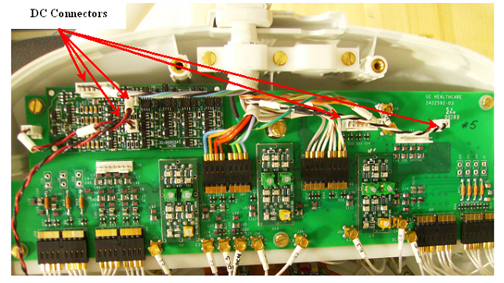
Figure 15. DC Connectors: HNU Illustration (2 System Cables) (Upgrade Specific) 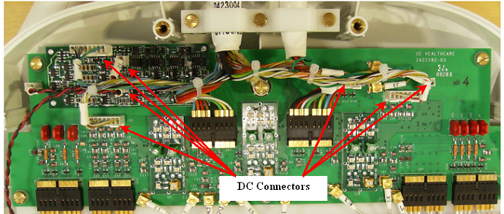
Figure 16. DC Connections: TLU 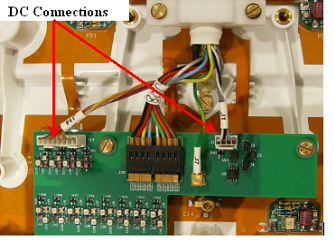
- Identify and remove GND connectors from interface board. See Figure 17. Pliers may
be necessary for removal of the PCX connectors, as they may be difficult
to unplug. This will help prevent accidental breakage of the cables.
See Figure 18.
Figure 17. GND Connectors 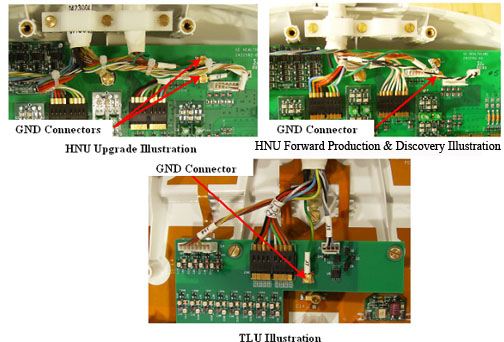
Figure 18. Using Pliers For Removal of Connectors 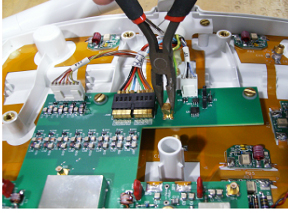
- Unscrew the Kevlar™ termination ring as shown in Figure 19. Retain original
screw used.
Figure 19. Kevlar™ Termination Screw 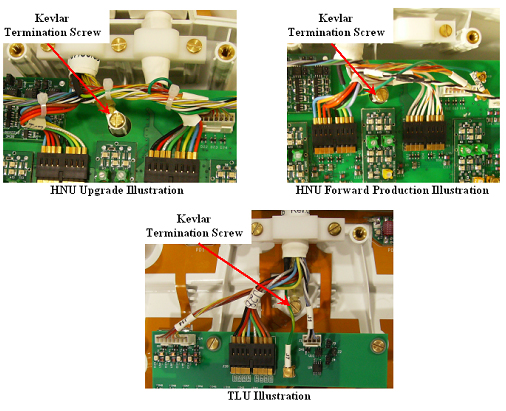
- Identify the Interface Board Assembly and the coil ID PCB located
on the Interface Board (Head Neck Unit (HNU) Only). Carefully remove the Coil ID assembly.
See Figure 20.
Figure 20. Interface Board and Coil ID PCB Locations 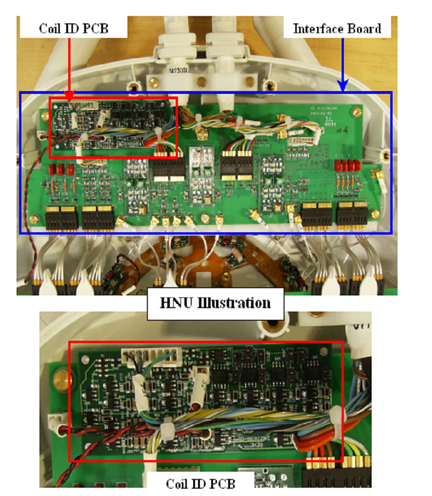
Finalization
Procedure
Perform a good bye scan with this coil to confirm that the repaired
coil operates properly.