
- Optima MR450w BASE 1.5T System Service Methods
- 5690012-2EN Revision 3
- 00000018WIA30AB0F20GYZ
- id_131069634.0
- Mar 23, 2020 2:47:59 PM
1.5T Cardiac Coil Setup for MCQA Test
Prerequisites
| Required persons | Preliminary requirements | Procedure | Finalization |
|---|---|---|---|
| 1 | Not Applicable | 15 minutes | Not Applicable |
| Item | Quantity | Effectivity | Part number | Manufacturer |
|---|---|---|---|---|
| TL Unified Phantom Set | 1 | Unified Phantom Set |
5343347 | - |
| Condition | Reference | Effectivity |
|---|---|---|
|
For HDx, HDxt and HDe, the following coil configuration names must be installed to run this tool: HDx CardiacServ. | - | - |
|
For Discovery MR450 and Optima MR450w, the following coil configuration names must be installed to run this tool: GE_HDx 8Cardiac. | - | - |
About this task
This procedure prepares for the automated SNR test using the 1.5T HDx Cardiac Array by GE/USAI, catalog M3335MD.
Note:
Coils do not ship with phantoms. Phantoms come in a unified phantom set with the MR system.
Unified Phantom Setup
Procedure
- Place the posterior section of the coil on the table as shown.
Figure 1. Posterior Section of Coil on Table 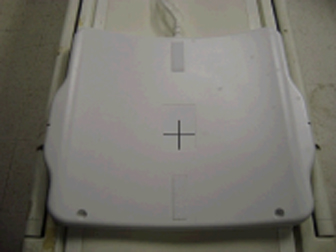
- Place the TL Unified Phantoms over the posterior section so
the phantom set is well centered in the S/I and R/L directions as
shown in both illustrations below.
Figure 2. Phantom Set Centered in S/I Direction 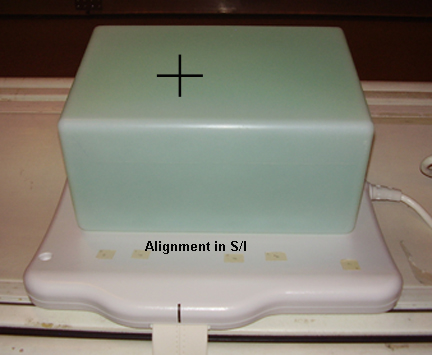
Figure 3. Phantom Set Centered in R/L Direction 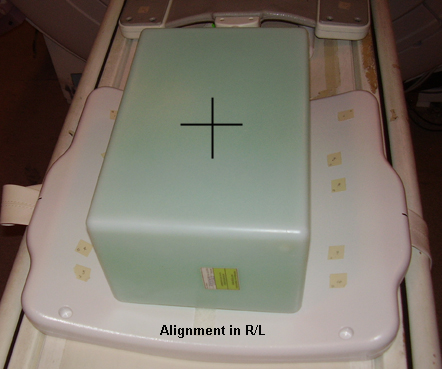
- Place the anterior section onto the phantom set so the coil
is well centered in both S/I and R/L directions as shown.
Figure 4. Coil Centered in Both S/I and R/L Directions 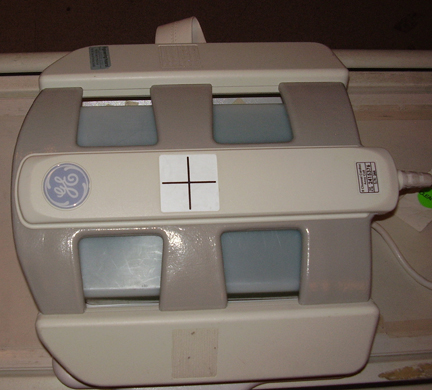
- Fasten the Velcro® straps to firmly snug the coil to the
phantom as shown below.
Figure 5. Placement of Velcro Straps 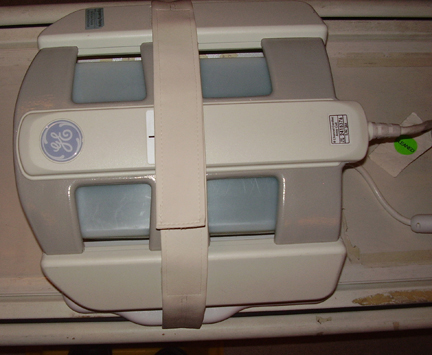
- Landmark the coil at the crosshairs as shown below, and Advance to Scan.
Figure 6. Landmarking on Coil Crosshairs 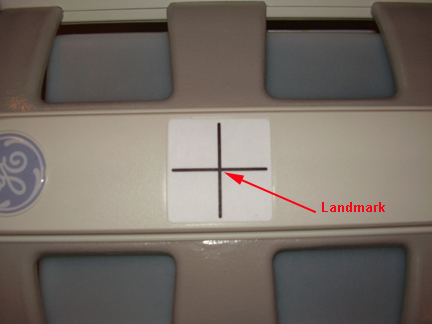
Finalization
Finalization
No finalization steps.