- Topic ID: task_vq3_m2m_qjb
- Version: 2.0
- Date: Dec 10, 2019 2:30:24 AM
Xtream Display Patient Information
Prerequisites
Overview
This procedure provides steps for Xtream Display Patient Information setting change.
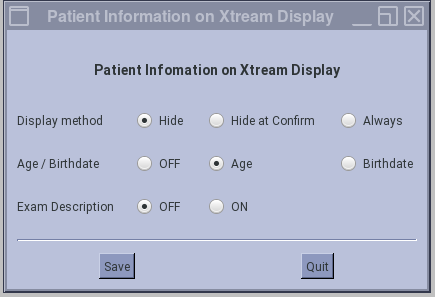
1 CSD -> Configuration -> Patient Information on Xtream Display
Procedure
- This is the setting of patient information display hide timing.
- Hide: Patient information is not displayed anytime.
- Hide at Confirm: Patient information will be hidden when Confirm button is pressed.
- Always: Patient information will be hidden at End Exam.
Figure 1. Patient Information on Xtream Display menu
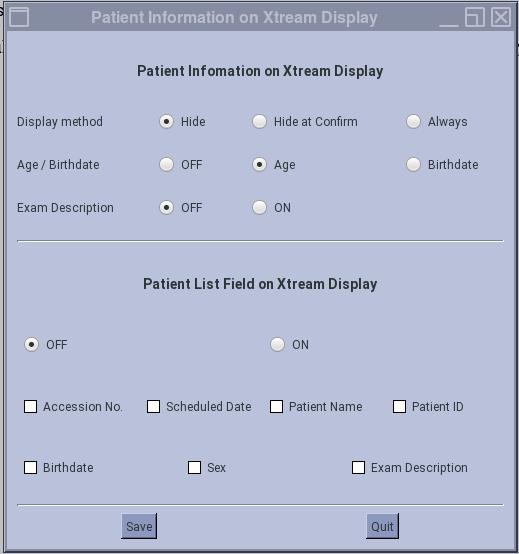
2 CSD -> Configuration -> Patient Information on Xtream Display (with One-Stop Scannning option)
Procedure
- Patient Information on Xtream Display will have additional fields when One-Stop Scanning option is installed. The upper portion is same as original setting. The lower portion has the setting of One-Stop Scanning display contents.
Figure 2. Patient Information on Xtream Display
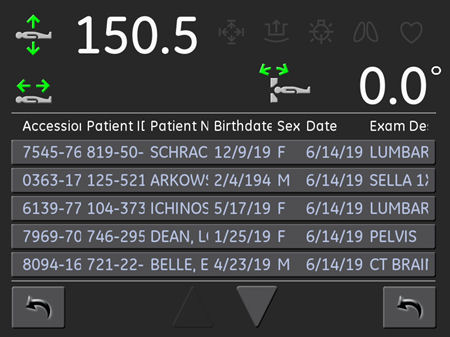
- The setting will be affected to Xtream display as shown in the following Illustration. Patient List field can be set to On/Off totally, and set to On/Off by each parameter.
Figure 3. The setting on Xtream Display
3 Finalization
No finalization steps.