- Topic ID: id_17423436
- Version: 3.0
- Date: Jan 20, 2020 8:32:07 PM
Short Footprint Setting Procedure
Prerequisites
Overview
Normally, the table cradle can travel up to 1400 mm from the home position. The Short Footprint function can limit this distance to a value between 1300 and 1400 mm (in 1 mm increments).
Some notes about the short footprint function follow:
-
If you moved the cradle out the set maximum distance, and when the table is lowered, then the cradle will move outward so that the cradle distance from the gantry remains unchanged. In this case also, the maximum cradle travel is limited to 1400 mm. And this control is executed only when the Positioning Lights are turned on.
-
If you moved the cradle into the set maximum distance while the table is not at the highest position, then the system will inhibit the table upward operation.
-
During the table characterization procedure, or while operating the cradle with the service switches on the GTCB board, the cradle is enabled to move up to 1400 mm, regardless of the short footprint set distance.
-
Safety clearance from cradle IN-limit to wall must be no less than 100 mm.
Procedure
- Attach the cradle extender on the cradle.
- Launch the Mechanical Characterization tool from the Service Desktop, Utilities tab.
- Select Short Foot Print.
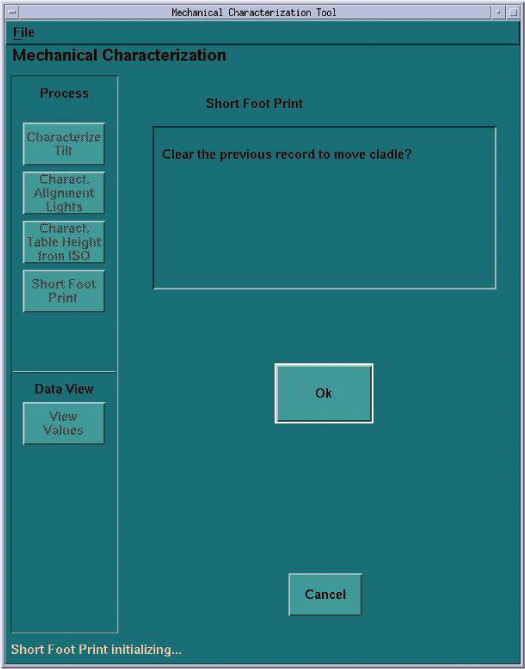
- Click OK in response to the “Clear the previous record to move cradle?" message.
This will erase the previously set distance of the maximum cradle movement. The maximum distance will be set to 1400 mm. See Figure 1.
Figure 1. Initial Screen
- Follow the on screen instructions.
You can set the desired cradle travel distance with any table height. After clicking Accept, the distance will be stored on the console computer.
- After the setting, verify that you can not move the cradle inward
further from the set position, with the following conditions:
-
The table is at the highest position.
-
The table is at a lowest position where scanning is possible.
-
Finalization
No finalization steps.