- Topic ID: id_17423387
- Version: 5.0
- Date: Jan 20, 2020 8:36:01 PM
Inspect Collimator Filters
Prerequisites
Overview
It is possible that the collimator filters may become contaminated during the collimator's life. If contamination is present then the collimator filter assembly may require cleaning.
Perform this inspection before installing the new tube unit. Also look at the tube's copper filter without removing the copper filter from the tube when you are swapping the tube. Remove any debris found before installing the new tube unit.
Procedure
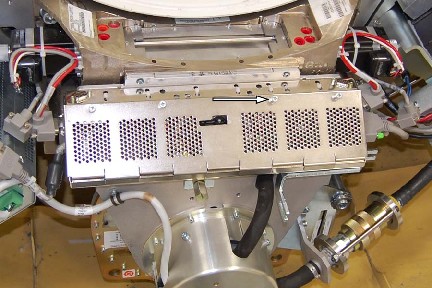
- Remove the Collimator Control Board Sheet Metal Cover.
Figure 1. Collimator Control Board Cover
- notice
- notice
- notice
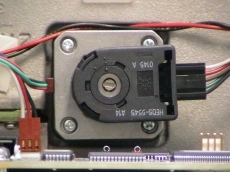
- With power removed from the gantry, turn the position adjuster
to position the large/small bowtie filter assembly so it is visible
through the input port or tube side of the collimator assembly.
-
CCW will move the filter into the beam.
-
Do not move the filter back to the home position.
Figure 2. Filter Position Adjuster
-
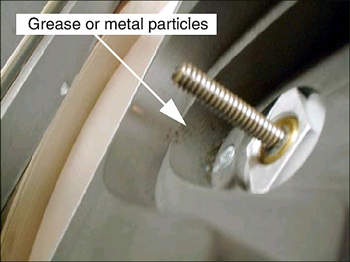
- Using a flashlight, inspect the bowtie filter for contamination.
Look through the input port or tube side of the collimator.
If contamination is visible, proceed to: Collimator Cleaning Procedure
Figure 3. Contaminated Bowtie Filter
- Move the large/small bowtie filter back out of the x-ray beam
path.note:
Only move the filter far enough to remove from the x-ray beam path so you can see the other filter. If you move it too far you may damage the limit switch.
- Repeat Step 2 and Step 3 for the blocking filter, calibration filter, and medium bowtie filter.
 |
|
|
Finalization
No finalization steps.