- Topic ID: id_16157866
- Version: 4.0
- Date: Jan 20, 2020 8:36:04 PM
GTCN Replacement (GT1700V)
Prerequisites
Overview
This procedure is for the GT1700V.
Procedure
- Raise the Table to maximum height.
- Move the Cradle to OUT limit position.
- Remove power from Table by turning off 120VAC, Axial Drive and HVDC switches on Service Switch Panel.
- Remove the left top cover.
- Cut any tie-wraps, and disconnect all cable connector from the GTCN Assy.
- Unscrew 7 screws, and remove the GTCN Assy.
- Install the new GTCN Assy into place, and tighten the 7 screws.
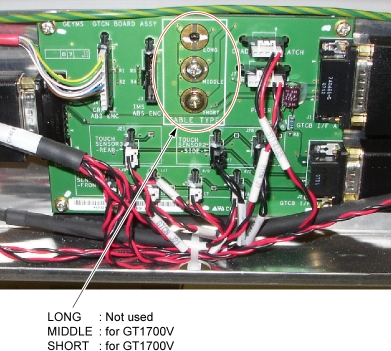
One of the screws is used for Table type identification. Select the
appropriate screw position depending on your Table type.
Figure 1. GTCN Assy
- Re-connect all wires and cable connectors, and fix the cables using tie-wraps.
Finalization
- Re-install the Table covers.
- Power up the Table from the Service Switch Panel.
- Verify that the Cradle function is operating normally.