- Topic ID: task_kj4_nhq_fjb
- Version: 3.0
- Date: Dec 29, 2020 1:03:50 AM
GSCB Replacement
Prerequisites
Overview
1 GSCB Removal
Procedure
- Select one of the following methods to Power OFF the Console:
- If Applications are up, click on the Shut Down button on desktop display and select Shutdown.
- If Applications are down, open a Terminal Window. Type: halt , then press Enter.
- When halt command has finished, power Off the console at the front panel switch.
- Apply LOTO for console.
- Remove the console rear chassis cover.
- Disconnect the GSCB cable assembly from the console.
- Remove the Keyboard from the GSCB Keyboard Mounting Plate and set aside.
2 Replacement GSCB Preparation
Procedure
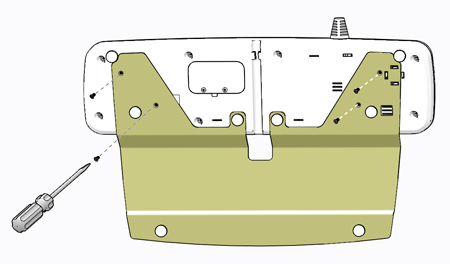
- Remove the four (4) Flathead Phillips screws to remove the Keyboard Mounting Plate from the original GSCB Assembly and transfer the mounting plate to the replacement GSCB using the same four (4) screws removed from the original assembly.
Figure 1. GSCB Keyboard Mounting Plate
- Open Service Access Panel on the rear of the GSCB and set configuration switches as necessary.
3 GSCB Install
Procedure
- Mount the Keyboard to the replacement GSCB Keyboard Mounting Plate removed earlier.
- Place the replacement GSCB assembly on the console top and route the GSCB Cable to the rear of the console.
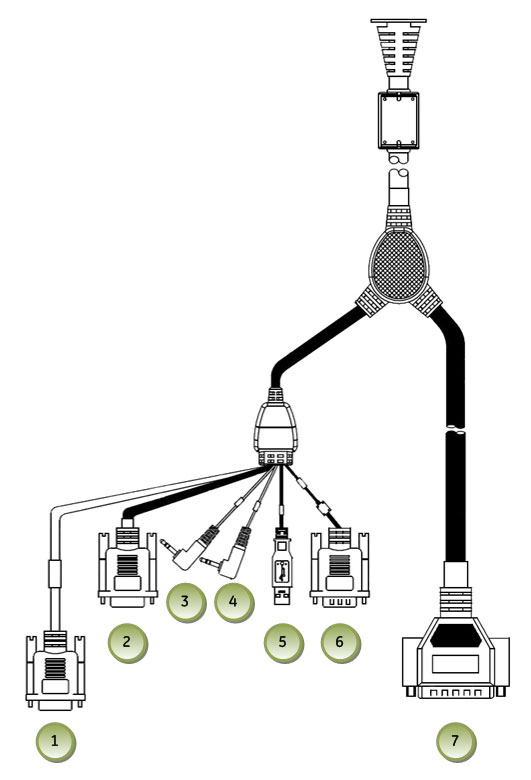
- Reconnect all cables removed earlier.
Figure 2. GSCB Cable Connections
- Remove LOTO on console.
4 Functional Checks, Alignments and Setups
Procedure
- Power On console.
- Perform the GSCB Functional Checks instructions from the procedure list.
5 Finalization
Procedure
- Install console rear cover. Refer to .
- Perform the instructions from the procedure list.
- Perform the instructions from the procedure list.