- Topic ID: id_17423486
- Version: 3.0
- Date: Dec 3, 2019 2:00:22 AM
Filter Replacement
Prerequisites
Procedure
- notice
- Move the cradle to the OUT mechanical limit position by hand.
- Raise the Table to its highest position.note: If the Table up/down movement is inoperative, use the service power cable to raise the Table (refer to Enforced Table Elevation) .
- Remove power from Table by turning off “120VAC”, “Axial Drive” and “HVDC” switches on the service switch panel.
- Remove the following cover from the Table:
-
Rear Bottom Cover (Refer to Table Cover Removal)
-
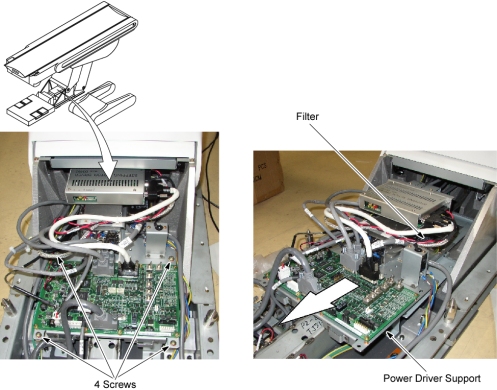
- Remove 4 screws, and slide the power driver support toward the
Gantry.
Figure 1. Location of Filter
- Remove the Stepping Motor Driver (refer to Stepping Motor Driver Replacement)
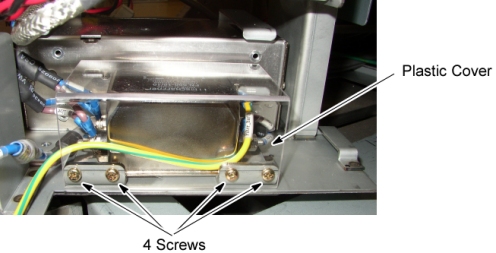
- Remove a plastic cover by unscrewing its 4 screws.
Figure 2. Plastic Cover Removal
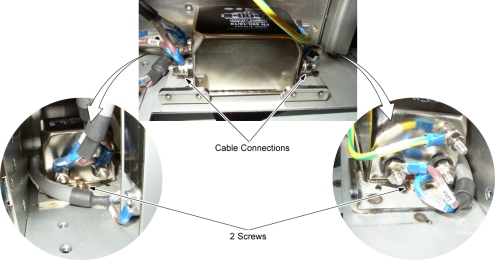
- Mark and remove the wires from the Filter.
- Remove the Filter by unscrewing its 2 screws.
Figure 3. Filter Removal
- Install the new Filter by referring toStep 9 through Step 5.
- Restore the Table to original configuration.
 |
Finalization
No finalization steps.