- Topic ID: id_16157862
- Version: 4.0
- Date: Jan 20, 2020 8:33:45 PM
Cradle Stepping Motor Driver Replacement
Prerequisites
Overview
This procedure is for the Global PET/CT Table, with fixed position IMS and the GT1700V Table.
Procedure
- Raise the Table to maximum height.
- Move the Cradle to OUT limit position.
- Remove power from Table by turning off 120VAC, Axial Drive and HVDC switch on Service Switch Panel.
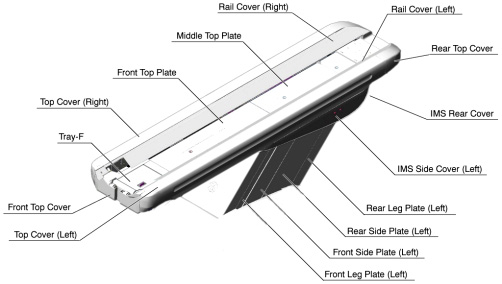
- Remove the following Table covers:
-
IMS Side Cover (Left)
-
Front Side Plate (Left)
-
Rear Side Plate (Left)
-
Front Leg Plate (Left)
Figure 1. Table Covers
-
- Disconnect 2 GND cables from the Table frame.
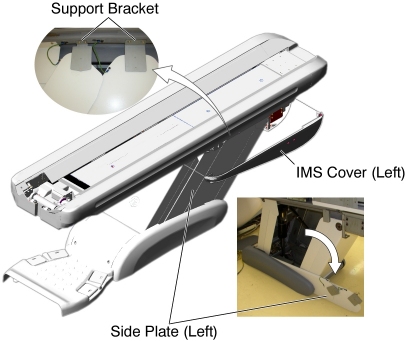
- Remove 2 upper support brackets of the side plates (left) by
unscrewing its 2 (x2) screws, and open the side plates (see Figure 2).
Figure 2. IMS Cover (Left) and Side Plates (Left) Removal
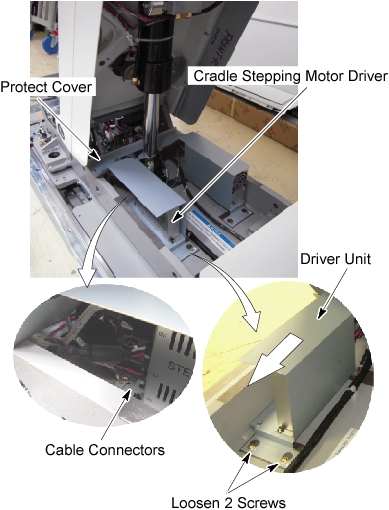
- Remove the protect cover by unscrewing 2 screws.
- Disconnect all cable connectors from the stepping motor driver.
- Loosen 2 screws behind the stepping motor driver unit, and slide it away from the Gantry, and remove it from the Table.
- Remove the defective stepping motor driver from stepping motor
driver unit, by unscrewing 2 screws.
Figure 3. Stepping Motor Driver Removal
- Install the new stepping motor driver by referring to Step 10 through Step 6.
Finalization
- Re-install the Table Covers.
- Power up the Table from the Service Switch Panel.
- Verify that the cradle IN/OUT function is operating normally.