- Topic ID: concept_xjx_zmy_w3b
- Version: 3.0
- Date: Dec 29, 2020 1:02:12 AM
Energy Saving Mode
1 Overview
Energy Saving Mode is designed to reduce the system power consumption. The Gantry Power is always on even though the user selected system shutdown at current GE CT Scanner. The Energy Saving reduces the system power when customer does not use the system (i.e. every night timeframe). Actually the Energy Saving Mode feature enables to turn off the Gantry rotation portion power after system shutdown and turn on at the preset time.
2 User Limitation
-
Air Conditioner of Scan Room shall be always ON.
-
This feature can not applied to Acute care hospital system.
-
Customer needs to wait until DAS/Detector temperature becomes specified temps and stable when the system power is on before preset time.
3 Functional Block Diagram
Figure 1. Energy Saving Block Diagram
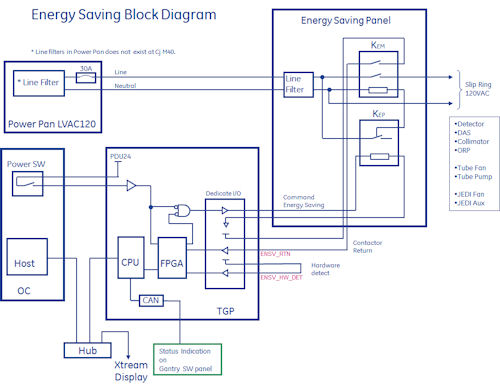
Figure 2. Select the PDF icon below to open the PDF version of the Energy Saving Block Diagram
energy_saving_block_diagram.pdfTGP has been redesigned to add “Dedicate I/O” portion to control Energy Saving Panel. TGP outputs the Command Energy Saving signal to the panel. The signal is AND logic of FPGA output and OC Power SW. This makes fail safe feature unexpected power off by TGP. The Energy Saving Panel contains two Contactors. One is main contactor for providing 120VAC to Gantry rotationally portion, and another one is the primary relay, which controls main contactor relay coil OFF (contact is Normally Closed). TGP receives the status signal from Energy Saving Panel. Also TPG receives the Energy Saving Panel hardware is connected or not. This signal is used to turn the TGP firmware on the Energy Saving feature. During Energy Saving mode is active, Gantry SW panel dot LED repeats turn on and off. The following is connected to 120VAC rotationally portion.
-
Detector, DAS, Collimator, ORP (PS 48VDC)
-
Tube Fan, Tube Pump (120VAC direct)
-
JEDI Fan, JEDI Aux. (120VAC direct)
The following powers become OFF at Cj M40 system.
-
Table Power
-
Gantry Top Fan
-
Gantry Heater Blower
4 Energy Mode Saving Sequence
4.1 Power Off Sequence
Figure 3. Enter to Energy Saving Mode
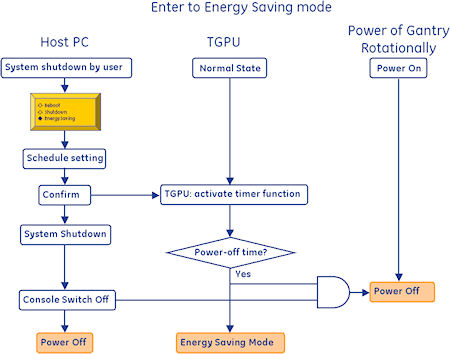
Figure 4. Select the PDF icon below to open the PDF version of the above illustration.
enter_energy_saving_mode.pdfFigure 5. Attention at Shutdown menu
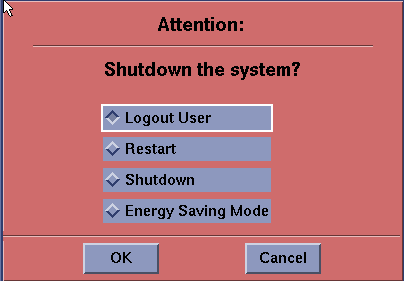
When the Energy Saving mode is selected and press OK, then TGP goes into activate timer function. TGP firmware sets power off timer count into Hardware timer after querying the remaining Tube Fan/pump on-time to Jedi via ORP. When OC power Switch turned off, Gantry rotational portion power becomes off. At that time, all of the dots on each digit on Gantry Switch panel are blinking to show Gantry is in Energy Saving mode.
Tube Fan/Pump timer is 1 hour after last scan completion or Gantry reset.
4.2 Power On Sequence
Figure 6. Exit from Energy Saving Mode
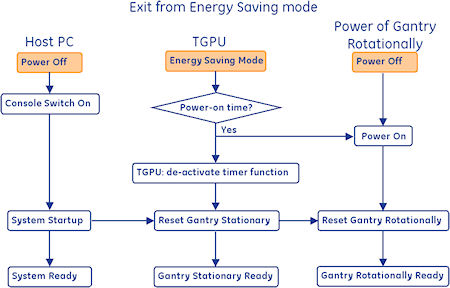
Figure 7. Select the PDF icon below to open the PDF version of the above illustration.
exit_energy_saving_mode.pdfAfter the timer has been out, Gantry rotational portion power is applied automatically, and TGPU de-activates the timer function. The normal start up sequence runs after the OC power switch turns ON. If the OC power switch turned ON before the timer is out, reset signal is sent to TGPU and it sets the Energy Saving timer to OFF, turn on the Gantry rotational portion power. In this case, Detector temperature may not be in specification, it causes bad image or disable scanning. Refer to Exception handling section in detail.
5 Setting
-
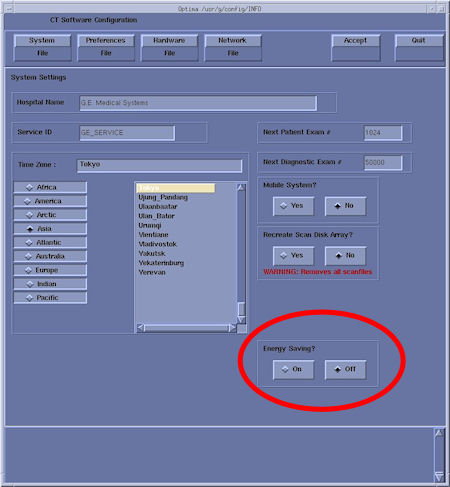
Reconfig: Energy Saving mode enable/disable setting. Default is OFF. Save State keeps the setting status.
Figure 8. Energy Saving Setting in Reconfig
-
Schedule setting: There are two setting screen to set the Energy Saving schedule. One is direct schedule entry and another one is wake up hour setting. See the following capture screens.
In case of wake up hour setting, it can be set from 6 hours to 14 days with 15 min. interval. In order to keep the Detector temperature stability, Gantry rotation portion power on time is set before 3 hours of shceduled Start up time.Figure 9. Schedule Entry (1)
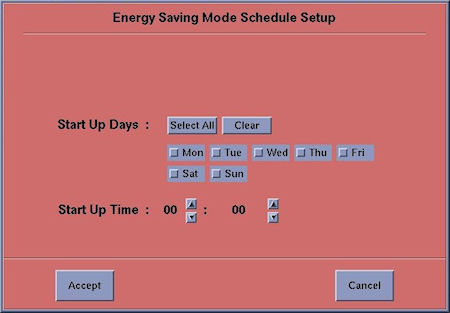
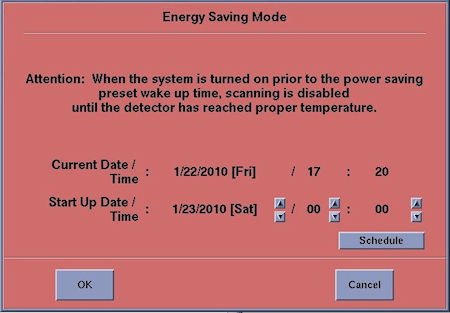 When “schedule” button is pressed, schedule setup screen appears to set weekly schedule setting.
Figure 10. Schedule Entry (2)
6 Exception Handling
The followings are Exception handling.
6.1 Cancel/ Re-schedule during Energy Saving mode setting
-
When “Cancel” is clicked in the pop-up for Energy Saving, setting process is canceled and the pop-up is closed.
-
Re-schedule Energy Saving mode if necessary.
6.2 Console is NOT switched off after completing/confirming Energy Saving mode
-
The system starts Energy Saving mode, but the Gantry Rotate is not powered off due to console switch-on. The timer function has been started at TGP side.
6.3 Re-schedule after Console switch off under Energy Saving mode
-
Power on the system by console switch on, and then Energy Saving mode is reset automatically by reset sequence during system power up. Rotationally portion power becomes ON.
-
Re-schedule Energy Saving mode from pink [shutdown] if necessary.
6.4 Gantry power off during Energy Saving mode
-
When the Gantry power off (for the maintenance or Power Outage) during Energy Saving mode, Gantry and Table are powered down and re-energized after the power comes back on. As a result, Energy Saving mode is cancelled.
-
Re-schedule Energy Saving mode from pink [shutdown] if necessary.
6.5 System power up during Energy Saving mode
-
When the detector temperature is normal at system power up, the system will be used normally.
-
When the detector temperature is lower than specification at system power up, the pop-up message is posted to inform the estimated time to become detector temperature normal.
-
When the detector temperature is lower than specification after system power up, patient scan is refused and the pop-up message is posted to inform the estimated time to detector temp. normal.
-
When the detector temperature is NOT normal after system power up, calibration process is refused and the pop-up message is posted. (Same as current condition)
-
Once the detector temperature becomes normal after system power up, the system will be used normally.
6.6 Communication failure during Energy Saving mode setting
-
When the communication failure (e.g. Host~TGPU, ORP~JEDI, and so on) is happened for Energy Saving, setting process is aborted and the pop-up is shown to inform setting failure.
6.7 Hardware failure during Energy Saving mode setting
-
When the hardware failure (e.g. Energy Saving Relay) is happened for Energy Saving, setting process is aborted and the pop-up is shown to inform setting failure.
6.8 Emergency Stop during Energy Saving mode
-
An Emergency Stop doesn’t affect Energy Saving mode.
7 Error log
The error is output to gesyslog as follows:
-
The errors and warnings related to Energy Saving mode are logged in gesyslog.
-
The process histories during Energy Saving mode are logged in gesyslog.
The following is example of gesyslog.
SR 284
1260907257 0 1 Tue Dec 15 20:00:57 2009 200520031 4
tc10bay environmentMgr
EnergySavingDialogMgr.c 858
User requested "12/16/2009 [Wed] 03:00" as Start up Date Time, and the system accepted it.
User clicked on "Confirm" button on Energy Saving Mode Success Popup.
EN 284
SR 558
1260907645 1 1 Tue Dec 15 20:07:25 2009 260142107 2
tgp tgp_subsys
EnergySavingMgr.cxx 165
Tue Dec 15 20:07:25 2009
Host : Table Gantry Processor Ermes # : 260142107
Exception Class : Secondary Severity : Pri/Soft
File : EnergySavingMgr.cxx Line# : 165
Function : No System Function Reported
Scan Type : None/Unknown Scan: 0/0/0
The system started up from Energy Saving Mode.
Operator Console was powered off 5 minutes ago.
Gantry rotating side was powered off 0 minutes ago.
Gantry rotating side was powered on 0 minutes ago.
EN 558