- Topic ID: task_zsr_w1m_53b
- Version: 3.0
- Date: Dec 29, 2020 1:03:54 AM
HP PC Battery Replacement Procedure
Prerequisites
Overview
This procedure is used for HP Host Computer Z8G4 about how to replace the battery from the mainboard.
Procedure
- Save all the BIOS customized configuration to removal media.note: For Z8G4 can use the USB device to save and restore the BIOS customized configuration, please refer to with USB device to save and restore the BIOS customized configuration.
- Select one of the following methods to Power OFF the Operator Console:
- If Applications are up, click on the Shut Down button and select Shutdown.
The Operator Console monitor will display a 'Power Down' message when it is acceptable to power OFF the Operator Console.
- If Applications are down, open a Unix Shell. Type: halt.
- If Applications are up, click on the Shut Down button and select Shutdown.
- Power OFF the console when ‘System Halted’ message is displayed, remove the power supply from the host computer (disconnect the power cord if connected).
- Press and hold PC power switch for at least 10 seconds after removing power cord. This will help to drain the stored power of the PC power supply unit.
- Remove the host computer cover refer to the relevant procedure.
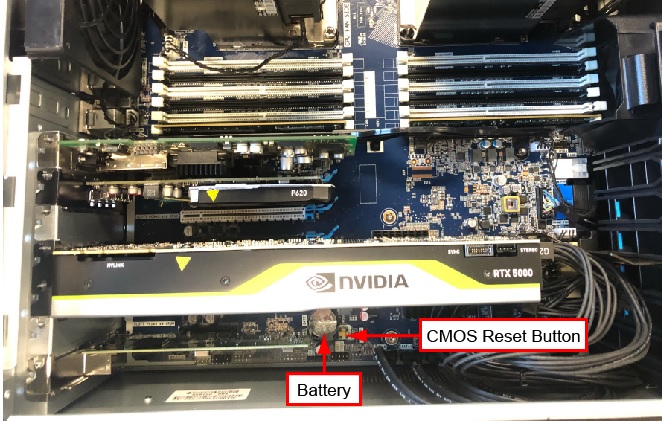
- Remove the defective battery from the mainboard.note: If the battery is covered, need to remove the relevant components priority from the mainboard.
Figure 1. Battery Location
- Let the system sit for 1~2 minutes.
- Install the new battery, then restore the power and restart the host computer.
- Press F10 as soon as the display is active and the HP logo displayed on the screen.
- Restore the BIOS customized configuration.
- Restore the console to original installation.
Finalization
No finalization steps.