- Topic ID: id_16157881
- Version: 4.0
- Date: Jan 20, 2020 8:32:11 PM
Tape Switch Replacement (GT1700V)
Prerequisites
Procedure
- Raise the Table to maximum height.
- Move the Cradle to OUT limit position.
- Remove power from Table by turning off 120VAC, Axial Drive and HVDC switches on Service Switch Panel.
- Remove table top cover (right/left).
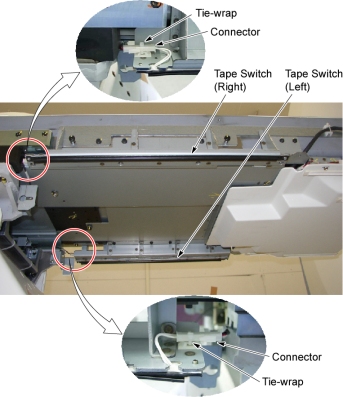
- Cut a tie-wrap binding the connector of tape switch to the tie-wrap base.
- Disconnect the connector.
Figure 1. Connector of Tape Switch
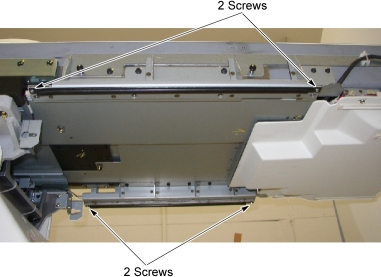
- Remove two screws holding the tape switch to the sheet metal
bracket.
Figure 2. Tape Switch Removal
- Peel off the tape switch from the sheet metal bracket, and take off the adhesive tape in that place.
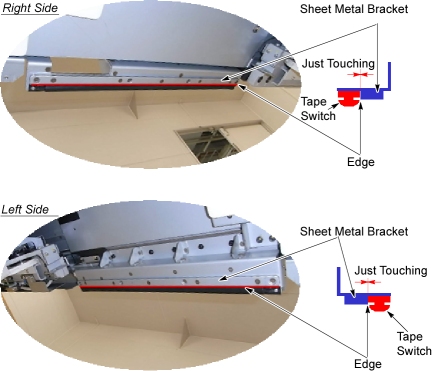
- Clean and dirt off the attaching surface of the sheet metal bracket using an alcohol.
- Peel off a paper from the new tape switch, and attach it along
the edge of the sheet metal bracket.
Figure 3. Tape Switch Installation
- Screw the two screws to fix the tape switch.
- Connect the connector of tape switch, and bind the connector to the tie-wrap base using the tie-wrap.
Finalization
- Power up the Table from the Service Switch Panel.
- Verify that the tape switch function is operating normally.
- Turn off all 3 switches (Axial Drive, HVDC, 120VAC), and re-install the table top cover.