- Topic ID: BJ_220429_B02
- Version: 2.0
- Date: May 13, 2022 1:40:55 AM
Table Speaker Replacement
Prerequisites
Overview
This procedure defines the replacement process for the table speaker of GT Table.
Procedure
- Raise the Table to maximum height.
- Move the Cradle/IMS to OUT limit position.
- Remove power from Table by turning off 120VAC, Axial Drive and HVDC switches on Service Switch Panel.
Figure 1. Table Cover
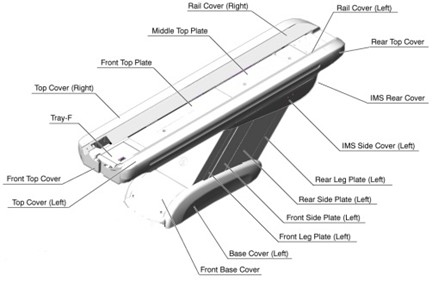
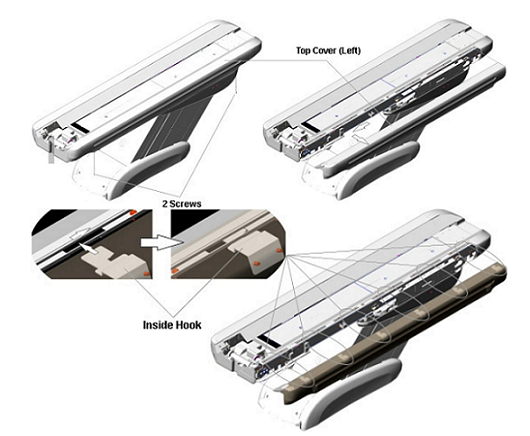
- Remove the screws (GT1700: one; GT2000: two) securing the table top cover. (See Figure 2)
- Slide the top cover toward the Gantry, to release the inside hook of the cover. (See Figure 2)
Figure 2. Left Top Cover Removal (example for GT2000)
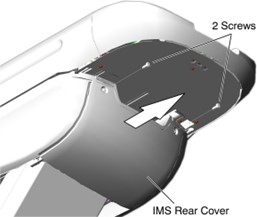
- Remove two screws, slide the IMS rear cover out of the table frame. (See Figure 3)
Figure 3. IMS Rear Cover Removal
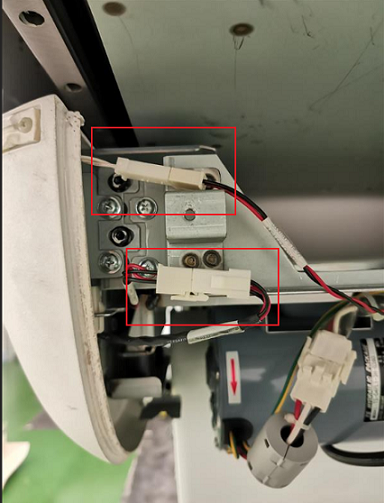
- After slide out IMS rear cover, two connectors of the touch sensor switch are visible. Disconnect these two cable connectors. (See Figure 4)
Figure 4. Two Connectors
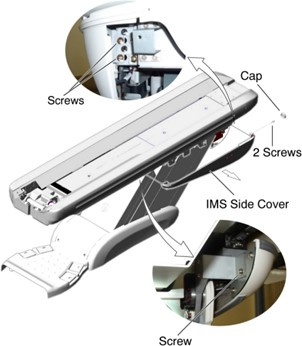
- Remove two screws (located at rear of the IMS Side Cover), and loosen one screw (located at front of the IMS Side Cover). Slide the IMS side cover from the Table. (See Figure 5)
Figure 5. IMS Side Cover (Left) Removal
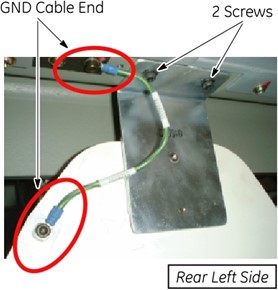
- Disconnect the ground cable(s) from the rear side plate. (See Figure 6)
Figure 6. Ground Cable
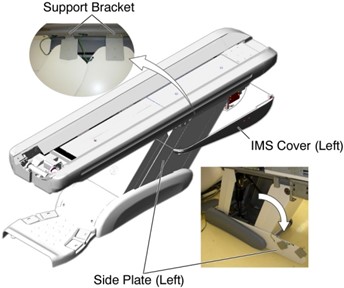
- Remove two upper support brackets of side plates by unscrewing 2 (x2) screws, and put the side plates on the floor. (See Figure 7)
Figure 7. Front and Rear Side Plates
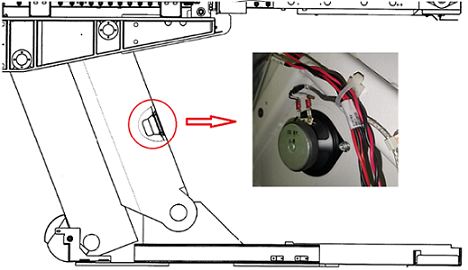
- Disconnect two wire leads from the speaker, then remove the defective speaker from the speaker spacer by un-securing two nuts. (See Figure 8)
Figure 8. Speaker Removal (example)
- Take out a new speaker, use the magnet on the speaker to fix it in an easy-to-operate position, then reconnect two wire leads. (See Figure 9)
Figure 9. Wire Leads
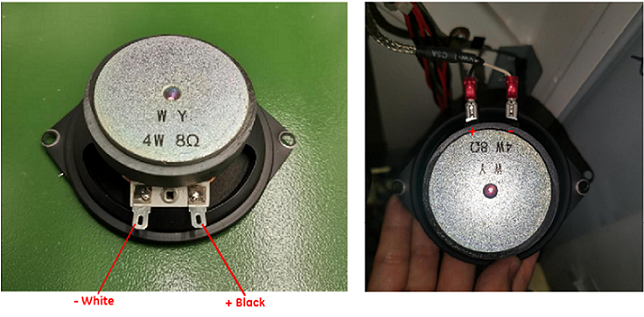
- Position the speaker to the speaker spacer of the table front arm, and fasten it by using two nuts.
- Restore the Table to original configuration according to the reverse order of removal.
1 Finalization
Procedure
- Power up the Table from the Service Switch Panel.
- Verify that the speaker is working normally.