- Topic ID: id_17423193
- Version: 4.0
- Date: Aug 10, 2021 9:56:52 PM
Open Console (Z840) System/Image HDD Replacement
Prerequisites
Overview
This procedure shall be followed when replacing the System or Image hard drive in a Z840 computer.
1 Preparation
Procedure
- Shutdown system. Select one of the following methods to Power
OFF the Console:
-
If Applications are up, click on the [Shut Down] button on desktop display and select [Shutdown].
-
If Applications are down, open a Terminal Window. Type: halt , then press ENTER.
-
When halt command has finished, power Off the console at the front panel switch.
-
- Apply LOTO. See Equipment Service - Lockout-Tagout-PPE procedure.
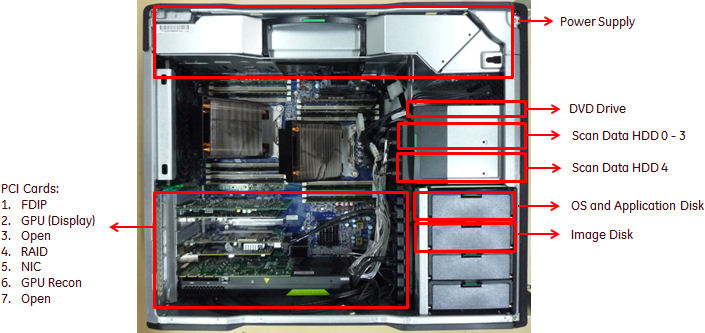
- Locate System or Image Hard Drive FRUs by referencing the Illustrations
below.
Figure 1. System or Image Disk Location
2 System or Image Hard Drive Removal
Procedure
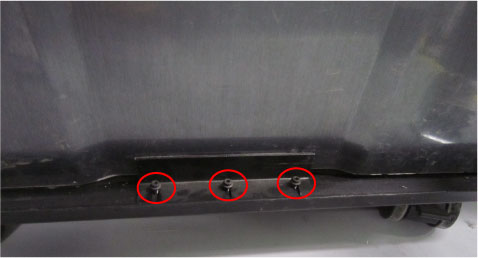
- Remove the Host Computer side access panel by loosen three screws
and pull out the latch to release the computer left side cover.
Figure 2. Side Access Panel Removal
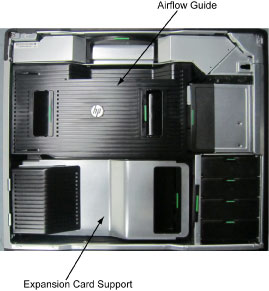
- Remove the following components from the host computer (Z840):
-
Expansion Card Support
-
Airflow Guide
Figure 3. Z840 Airflow Guide and Expansion Card Support
-
- Remove the original Hard Drive assembly from the computer’s
drive bay. See below illustration.
Figure 4. Hard Drive Assembly
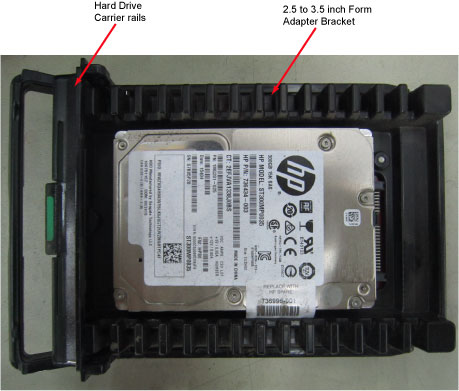
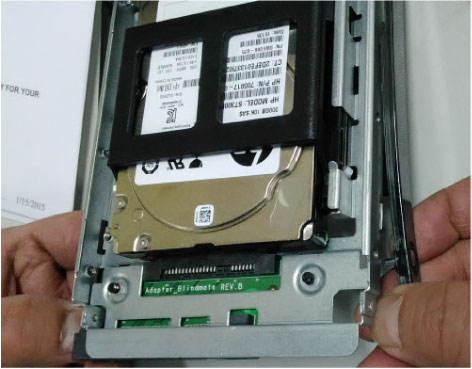
- Remove the 2.5 to 3.5 inch Form Factor Adapter Bracket with
Hard Drive from the Hard Drive carrier rails. See below illustration.
Figure 5. Factor Adapter Bracket with Hard Drive from the Hard Drive carrier rails
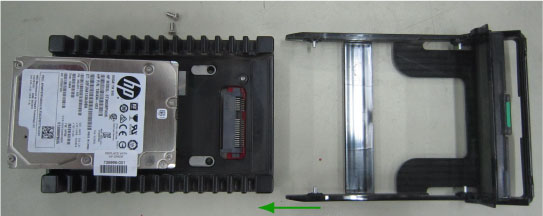
- Pull out the Hard Drive from the 2.5 to 3.5 inch Form Factor
Adapter Bracket horizontally. See below illustration.
Figure 6. Remove Hard Drive from the 2.5 to 3.5 inch Form Factor Adapter Bracket
3 System or Image Hard Drive Preparation
Procedure
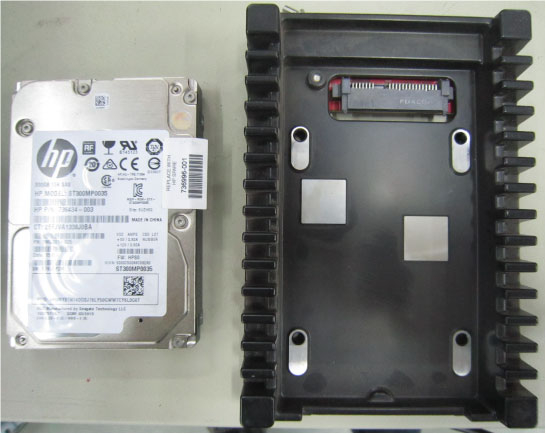
- Install replacement Hard Drive into the original 2.5 to 3.5
inch Form Factor Adapter Bracket removed from original Hard Drive.
Figure 7. Factor Adapter Bracket Assembly
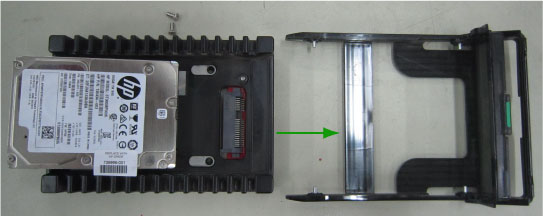
- Install replacement Hard Drive with Form Factor Adapter Bracket
into original Hard Drive carrier rails.
Figure 8. Hard Drive Form Factor Brackets and Carrier Rail Assembly
4 System or Image Hard Drive Install
Procedure
- Install the replacement Hard Drive assembly into the computer drive bay.
- Close Side Access Panel.
5 Finalization
Procedure
- Perform a Load From Cold (LFC).
Refer to appropriate LFC procedure in Service Methods.
note:When a hard disk drive, which was previously used in a RAID volume, is reused ads system or image disk, clearing the configuration information in the hard disk drive is required.
Refer to RAID Disk Clear Configuration Procedure.
- Reinstall the host computer side cover and all removed components, and reconnect any cables that have been disconnected.
- Perform the Functional Checks → System Scanning Test instructions from the procedure list.
- Remove LOTO on console.