- Topic ID: id_17423383
- Version: 5.0
- Date: Feb 22, 2022 12:50:25 AM
Cradle Replacement
Prerequisites
Overview
Procedure
- notice
- Move the cradle OUT to its fully retracted position (farthest from Gantry).
- Raise the Table to its highest position.
- Remove power from Table by turning off “120VAC”, “Axial Drive” and “HVDC” switches on the service switch panel.
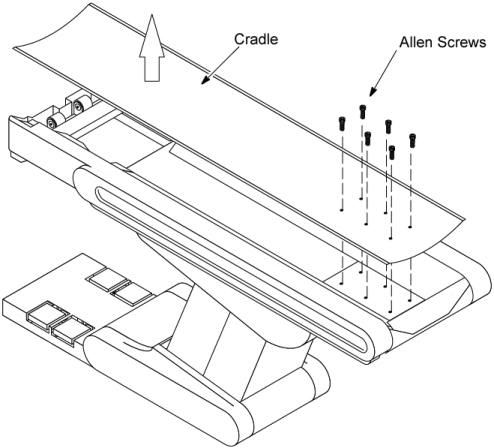
- Remove the six Allen screws from the cradle end, and then slide
out the cradle.
Figure 1. Cradle Replacement
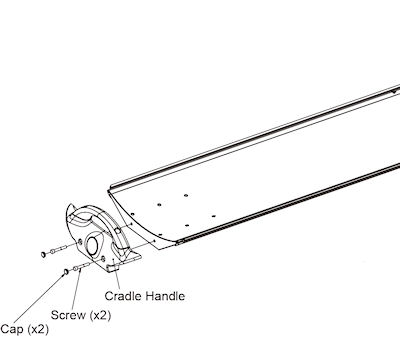
- Remove the handle from the cradle assembly.
Figure 2. Cradle Handle

 caution
- Install the handle to the new cradle.
- Install the cradle assembly to the table.
 |
Finalization
- After installing the new cradle, perform the following adjustment according to Align, Setup, Cals -> Table.
-
GAP BETWEEN CRADLE AND CRADLE SUPPORT
-
- Perform System Scanning Test from the Functional Checks menu of the service manual to ensure system operation.