- Topic ID: id_17423158
- Version: 2.0
- Date: Mar 6, 2020 9:57:15 PM
Configuring Gantry Tilt for Extender Removal
Prerequisites
Overview
This document describes how to enable the Gantry Tilt for Extender Removal feature on CT system. The Gantry Tilt for Extender Removal is feature that allows customer to easily remove or install the cradle extender at the table lowest position.
When this feature is enabled, the gantry behaves as follows:
-
The Load foot pedal moves the gantry to 0 degree if the gantry is tilted. When the foot pedal is released, the movement is stopped.
-
The Unload foot pedal moves the gantry to 8 degrees forward. When the foot pedal is released, the movement is stopped.
This feature is available on the Optima CT680 with 16BW45.x or later software
Procedure
- Click the Service Icon on the Display Monitor, and the Common Service Desktop (CSD) will appear.
- Select the Configuration Tab on the CSD and find the Gantry Table User Preference in the menu.
- The Gantry Table User Preference window will appear.
Figure 1. Gantry Table User Preference Window
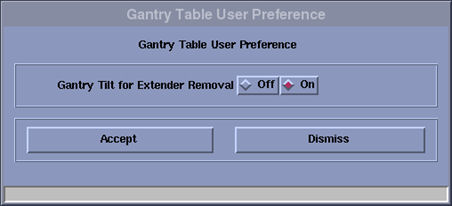
- The Select On for “Gantry Tilt for Extender Removal”. (The default setting is Off.)
- Click Accept .
- Reboot the system.
Finalization
- Move the table elevation by foot pedal. Confirm the gantry tilt behaves as expected.