- Topic ID: id_17422951
- Version: 1.0
- Date: Aug 23, 2018 11:14:18 PM
Console Network Switch Troubleshooting
1 Overview
The follow information will assist in confirming if the CNS is experiencing a hardware fault. Although the following is not a complete set of diagnostics, it should be sufficient in determining if the CNS is suffering from hardware issues at the prescribe Field Replaceable Unit (FRU) level.
 |
|

2 Specification
RJ45 : 10/100/1000 auto-sensing for 10base -T, 100base-TX or 1000base-T.
3 CNS General Troubleshooting
Before proceeding with the rest of this procedure, use the following checklist to find possible solutions for CNS problems.
3.1 Power Check
-
Is the CNS powered on?
-
Is the Power LED illuminated?
-
Is the CNS connected to the proper electrical outlet on the AC Box?
3.2 Cable Check
Are all Ethernet Cables properly inserted?
4 CNS LEDs
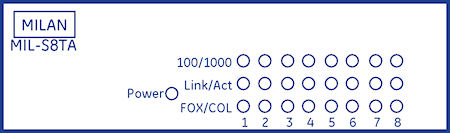
The CNS has LEDs mounted on its front panel to give operational status of the Switch and Ethernet ports.
Figure 1. CNS LED Indicators