- Topic ID: id_16157933
- Version: 4.0
- Date: Apr 22, 2019 12:56:51 AM
Clean Tube Heat Exchanger and Clean JEDI Inverter Fans
1 Clean Tube Heat Exchanger
-
Ensure that the Axial drive enable switch is turned OFF at the gantry service switch panel.
-
Rotate the gantry until the Tube Heat Exchanger assembly is within serviceable reach.
-
Engage the gantry rotation lock.
-
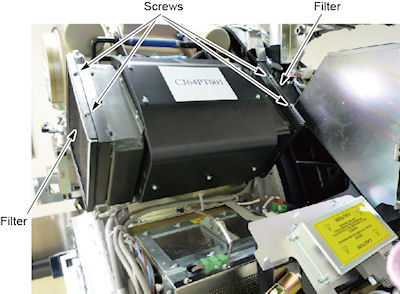
Remove the four screws on the top of the assembly and clean the filters (see Figure 1).
Figure 1. Screw Locations
-
Inspect the radiator and clean, if necessary.
-
Inspect the fans, remove the shroud, and clean, if necessary.
-
Reassemble the filters and fan shroud. When reinstalling the filter, make sure the lower edge of the filter engages the tabs on the heat exchanger frame.
2 Check/Clean JEDI Inverter Fan
-
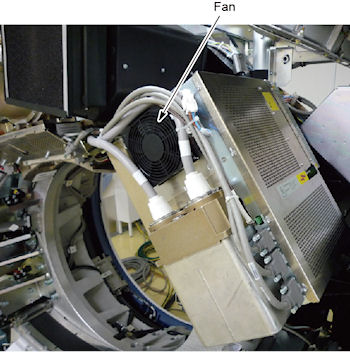
Inspect the inverter fans for accumulated dirt (see Figure 2).
-
Vacuum any dust that has accumulated on the inverter fan grills, if necessary.
Figure 2. JEDI Inverter Fans