- Topic ID: BJ_211028_N02
- Version: 2.0
- Date: May 23, 2022 11:25:40 PM
Z8G4 KDIP Card Replacement
Prerequisites
Overview
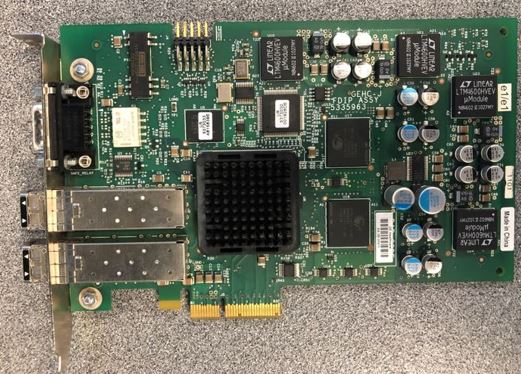
This procedure shall be followed when replacing the KDIP Card in a Z8G4 computer.
Figure 1. KDIP Card
1 Preparation
Procedure
- Shutdown system. Select one of the following methods to Power OFF the Console:
-
If Applications are up, click on the [Shut Down] button on desktop display and select [Shutdown].
-
If Applications are down, open a Terminal Window. Type: halt , then press ENTER.
-
When halt command has finished, power Off the console at the front panel switch.
-
- Apply LOTO. See Equipment Service - Lockout-Tagout-PPE procedure.
2 KDIP Card Removal
Procedure
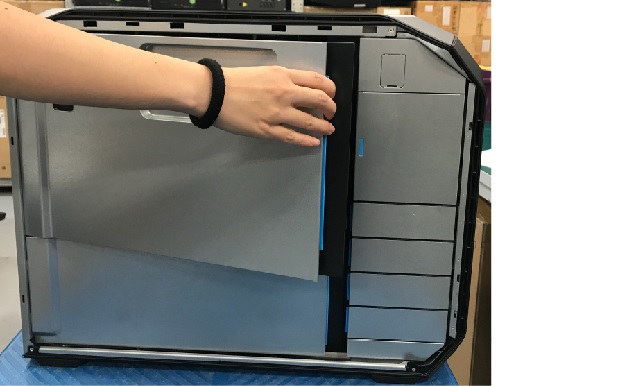
- Open and remove the module small side cover
Figure 2. Remove module small side cover
- Locate KDIP Card by referencing the Illustration below.
Figure 3. Z8G4 Component Location
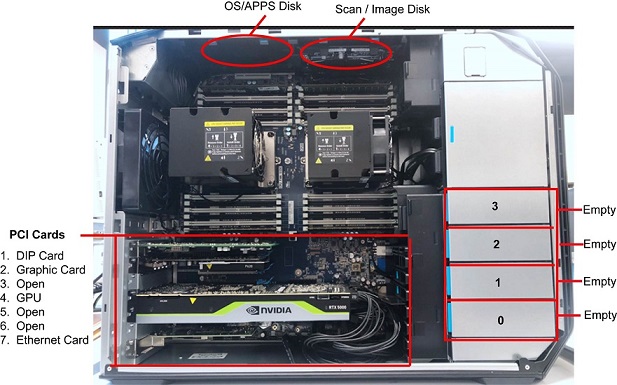
- Pull out the old KDIP card from the host computer (slot 1).
3 KDIP Card Install
Procedure
- Reinstall the KDIP card.
- Reinstall all removed components, and reconnect any cables that have been disconnected.
- Remove LOTO from console.
4 Finalization
Procedure
- Reinstall module small side cover
- Reinstall the host computer left side panel.
- Confirm Host Computer powers up when console power is turned on.
- Perform the Functional Checks → System Scanning Test instructions from the procedure list.