- Topic ID: id_17423454
- Version: 2.0
- Date: Mar 6, 2020 10:01:24 PM
Service outlet and E-Stop Button Replacement
Prerequisites
Overview
Procedure
- Remove gantry right side cover (and left side if necessary).
Refer to

- notice
- Turn off all three (3) switches (Axial Drive, HVDC, 120VAC) on the Service Switch Panel.
- Verify there is no electricity at the outlet.
- Remove the cable connection on the bottom of the assembly.
Figure 1. Service Outlet and E-stop Assembly
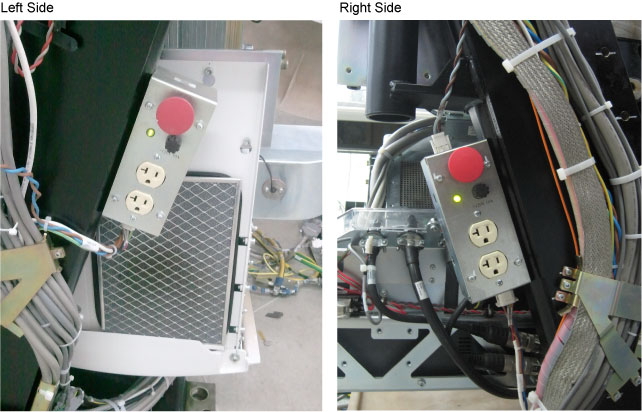
- Remove the four (4) hex screws that fasten the plate assembly to the chassis.
- Install the Service Switch and E-Stop assembly and reconnect
the cable.
- notice
- Turn on the 3 service switches.
Finalization
- Confirm that all E-stop buttons are operational.
- Enable the table drives after E-stop reset by use of the cover control panel drives reset button or drives reset button on service switch panel lower right corner.
- Reinstall gantry side covers.