- Topic ID: id_11038719
- Version: 3.0
- Date: Jun 10, 2020 2:29:06 AM
NIO16 Host Computer (Z820) DVD Drive Replacement
Prerequisites
Overview
This procedure shall be followed when replacing the DVD Drive in the Z820 computer on a NIO16 Console.
Procedure
- Select one of the following methods to Power OFF the Operator
Console:
- If Applications are up, click on the Shut Down button and select Shutdown.
The Operator Console monitor will display a 'Power Down' message when it is acceptable to power OFF the Operator Console.
- If Applications are down, open a Unix Shell. Type: halt.
- If Applications are up, click on the Shut Down button and select Shutdown.
- Power OFF the console at the front panel switch.
- Remove the front and left side cover from the console.
Refer to
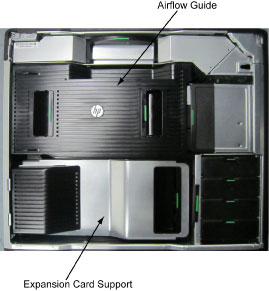
- Remove the following components from the host computer (Z820):
-
Side Access Panel
-
Airflow Guide
-
Expansion Card Support
Figure 1. Airflow Guide and Expansion Card Support
-
- Disconnect the cables for DVD drive.
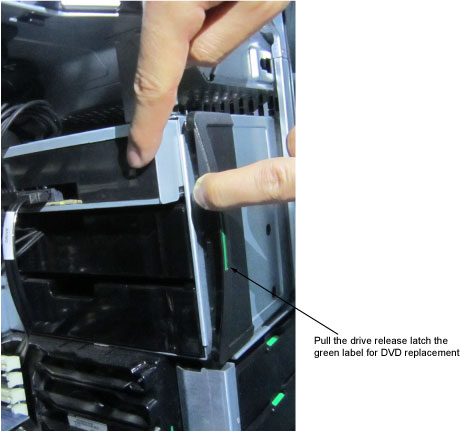
- Pull the drive release latch, and pull out DVD drive.
Figure 2. Drive Release Latch
- Replace the existing DVD drive with new one.
- Reinstall all removed components, and reconnect any cables that have been disconnected.
Finalization
Refer to Replacement → Console → Console Cover Removal and Installation Procedure.