- Topic ID: id_11039057
- Version: 3.0
- Date: May 23, 2022 11:26:02 PM
KFC Fan Controller Board Replacement
Prerequisites
1 KFC Fan Controller Board Removal
Procedure
- Move the table cradle to the home position, and position the table to its lowest elevation.
- Remove gantry right side cover.
- notice
- Turn OFF Axial Enable, HVDC, and 120VAC switches on the service switch panel.
- Remove the rest of the gantry covers except the gantry rear cover.
- Position the DAS at 12 o’clock position.
- Disconnect the four cable connectors from the KFC box.
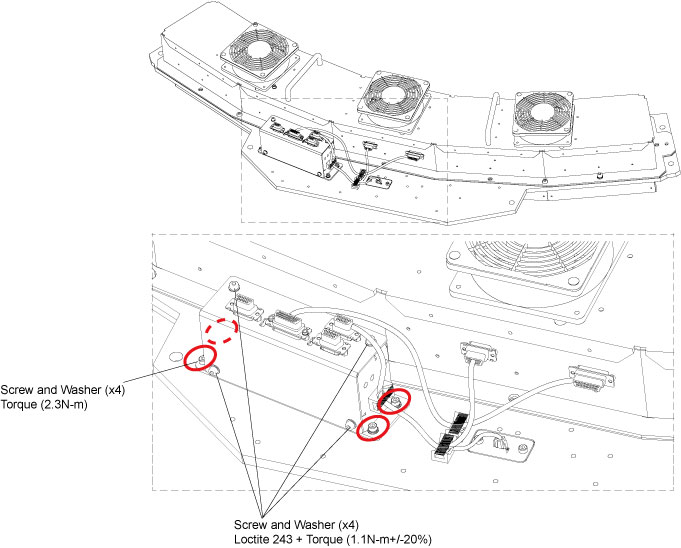
- Remove the KFC box from the vyper plenum plate by unscrewing its four screws. (See Figure 1)
- Remove the KFC box bottom plate together with the fan controller
board by unscrewing four screws.
Figure 1. KFC Box Bottom Plate Removal
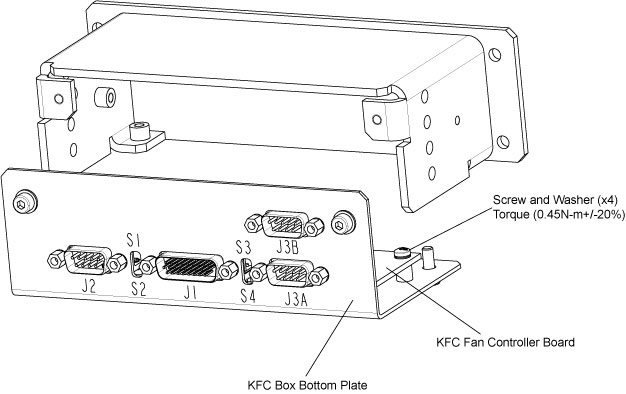
- Remove the KFC fan controller board from the KFC box bottom plate by unscrewing its four screws.
 |
2 KFC Fan Controller Board Installation
Procedure
- Secure the new KFC fan controller board to the box bottom plate by using four screws and washers. (Torque: 0.45N-m +/- 20%)
- Secure the KFC box bottom plate together with the fan controller board to the air filter and guide assy by using four screws and washers. (Loctite 243 and Torque: 1.1N-m +/- 20%)
- Secure the KFC box to the vyper plenum plate by using four screws and washers. (Torque: 2.3 N-m)
- Reconnect the cable connectors removed in Step 6 and secure cables by using cable clamps.
- Turn on Axial Enable, HVDC, and 120VAC switches.
- Verify that the KFC fan controller board is operating normally.
- Restore the gantry original configuration.