- Topic ID: id_24368284
- Version: 3.0
- Date: Jun 10, 2020 2:28:56 AM
HP PC Battery Replacement Procedure
Prerequisites
Overview
Procedure
- Save all the BIOS customized configuration to removal media.note:
For xw8400/xw8600/Z400/Z800/Z820/Z840/Z8G4 can use the USB device to save and restore the BIOS customized configuration, please refer to with USB device to save and restore the BIOS customized configuration.
For xw8200 can’t use the USB device to save and restore BIOS customized configuration, please follow the Load GE Required BIOS Configuration Software in PC BIOS Install & Setup for HP xw8200 Host Computer to save and restore the customized configuration.
For xw8000 also can’t use the USB device to save and restore the BIOS customized configuration, please follow the Host Computer BIOS Standard Setting Procedure in ADVANCED DIAGNOSTICS manual to restore the BIOS customized configuration.
- Select one of the following methods to Power OFF the Operator
Console:
- If Applications are up, click on the Shut Down button and select Shutdown.
The Operator Console monitor will display a 'Power Down' message when it is acceptable to power OFF the Operator Console.
- If Applications are down, open a Unix Shell. Type: halt.
- If Applications are up, click on the Shut Down button and select Shutdown.
- Power OFF the console at the front panel switch when ‘System Halted’ message is displayed, remove the power supply from the host computer (disconnect the power cord if connected).
- Press and hold PC power switch for at least 10 seconds after removing power cord. This will help to drain the stored power of the PC power supply unit.
- Remove the console cover and host computer cover refer to the relevant procedure.
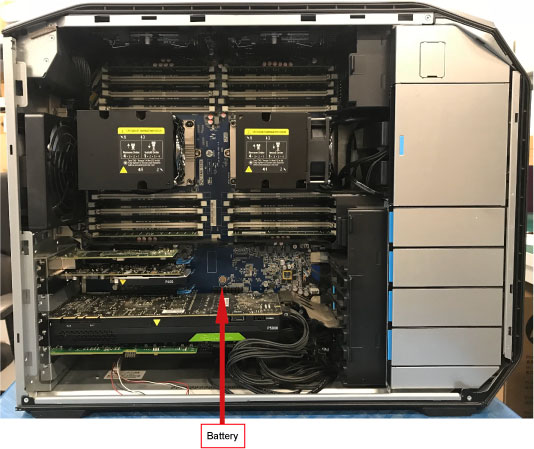
- Remove the defective battery from the mainboard.note:
If the battery is covered, need to remove the relevant components priority from the mainboard.
Figure 1. Battery Location in Z800
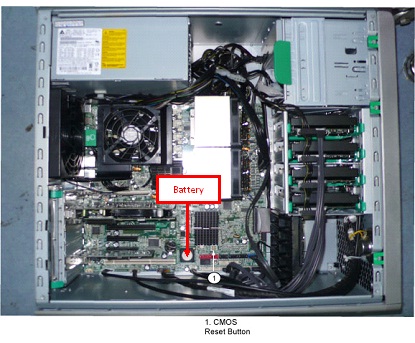
Figure 2. Battery Location in Z820
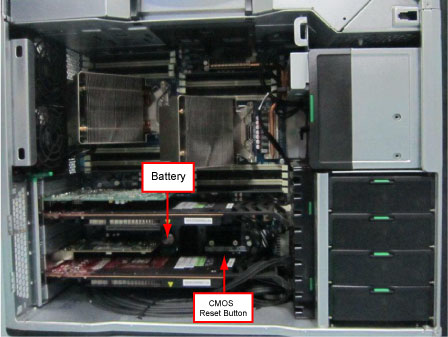
Figure 3. Battery Location in Z840
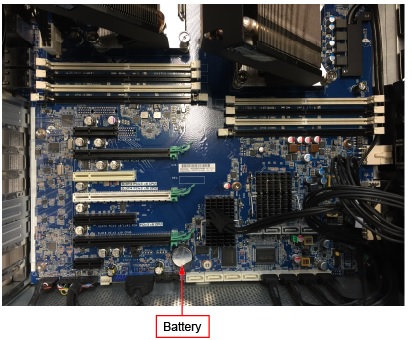
Figure 4. Battery Location in Z8G4
- Let the system sit for 1~2 minutes.
- Install the new battery, then restore the power and restart the host computer.
- Press F10 as soon as the display is active and the HP logo displayed on the screen.
- Restore the BIOS customized configuration.
- Reinstall the console covers.
Finalization
No finalization steps.