- Topic ID: id_11038826
- Version: 3.0
- Date: Mar 6, 2020 10:00:12 PM
HP Host Computer Z820 Replacement
Prerequisites
1 Removal Procedure
Procedure
- Select one of the following methods to Power OFF the Operator
Console:
- If Applications are up, click on the Shut Down button and select Shutdown.
The Operator Console monitor will display a 'Power Down' message when it is acceptable to power OFF the Operator Console.
- If Applications are down, open a Unix Shell. Type: halt.
- If Applications are up, click on the Shut Down button and select Shutdown.
- Power OFF the console at the front panel switch.
- Remove the front and top covers.
Refer to
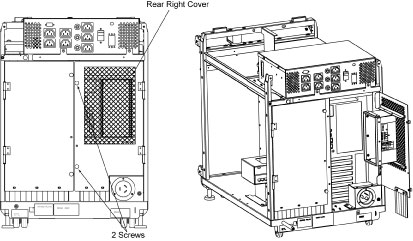
- Loosen two screw of the rear right cover, and open the rear
right cover.
Figure 1. Rear Right Cover
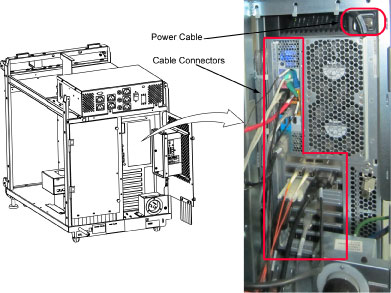
- Disconnect the power cable and all cable connectors from Z820.
Figure 2. Z820 Rear View
- Remove four screw that hold the z820 to the console chassis.
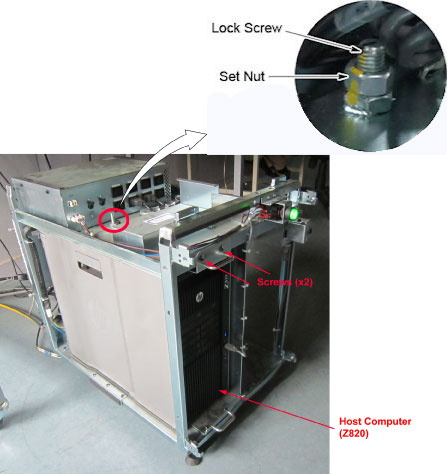
- Loosen the set nut, and loosen the lock screw.
Figure 3. Set Nut and Lock Screw

 caution
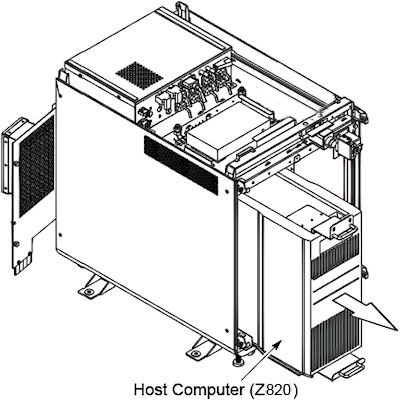
- Slide the host computer (Z820) out of the console.
Figure 4. Host Computer (Z820) Removal
2 GPU Card Installation
If the GPU card (Recon Graphic Card) is in the old host computer, please remove and install it to the new host computer according to Z820 GPU Card Replacement
3 Installation Procedure
Procedure
- Slide the new host computer into the Operator Console from the front.
- Tighten the four screws to secure the host computer to the chassis of console.
- Tighten the lock screw to fix the host computer, and tighten the set nut.
- Re-Connect the power cable and all cable connectors.
- Power ON the Operator Console at the console’s front panel switch.
- Verify that the host computer has powered up and is not displaying or sounding any errors.
- In order to assure proper operation of the host computer it is necessary to perform software Load from Cold (LFC).
- After completing the software LFC, make certain that you perform a final Save System State.
4 Finalization
Procedure
- After completing the LFC procedure, perform a complete shutdown of the Operator Console and restart the system.
- Reinstall the console covers.