- Topic ID: id_17479582
- Version: 2.0
- Date: Nov 19, 2019 11:09:52 PM
Collimator Control Board (CCB) Replacement
Prerequisites
Overview
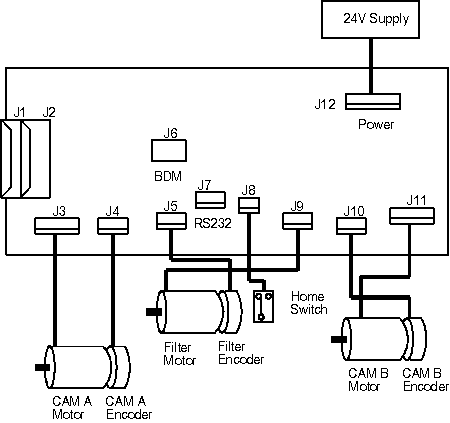
Refer to Figure 1 for this replacement procedure.
Figure 1. Collimator Control Board (CCB) Replacement
 |
|

note:
Please check the component P/N when replace the collimator related parts, should be ordered the same P/N according to the label on each component.
Procedure
- Remove gantry power. Ensure that all appropriate Lockout/Tagout procedures are followed.
- Remove the gantry side, top and front cover.
- Turn OFF all 3 switches (AXIAL DRIVE ENABLE, HVDC ENABLE, 120 VAC) on the Service Switch Panel (SSP).
- Position the gantry with the XRT at six-o'clock.
- Remove the top cover from the Collimator by removing the five pan head M4 mounting screws that have spring washers.
- Disconnect the power cable at connector J12, on the lower side on the Collimator.
- Disconnect the two 15 pin D CAN bus connections, J1 and J2, on the upper side of the Collimator.
- Remove the four CAN bus connection jackscrews with flat washers & lock washers.
- Disconnect the CAM A(J4) & B(J10) encoder cables.
- Disconnect all of the remaining cables as shown in the illustration.
- Remove the six pan head M4 mounting screws.
- Remove the replacement CCB from it's shipping container.
- Place the new CCB on the Collimator.
- Place the old CCB in the shipping container.
- Install the six pan head screws loosely to hold board in place.
- Install & tighten the four CAN bus connection jackscrews.
- Tighten the six pan head screws.
- Re-connect the power cable at connector J12, on the Collimator lower end.
- Re-connect the two 15 pin D CAN bus connections, J1 and J2, on the upper side of the Collimator.
- Re-connect the CAM A(J4) & B(J10) encoder cables.
- Re-connect the remaining cables as shown in the illustration.
- Enter replacement procedures software menu.
- Enter Collimator.
- Access Flash Download Tool and follow the procedure to flash
the characterization file onto the CCB.note: CCB PWA is static sensitive and is to be loaded with Collimator characterization file specific to frame assembly and linked to the manufacturer’s serial number or GE serial number.
- Replace the top cover of the Collimator using the five pan head mounting screws with spring washers and tighten.
Finalization
- Perform the following procedures:
- Collimator Calibration