- Topic ID: id_17479556
- Version: 2.0
- Date: Jun 10, 2020 2:24:22 AM
Checking the C-Pulse
Prerequisites
Overview
Procedure
- Refer to the safety procedure to remove the correlative gantry covers.
- Rotate the gantry until the opto-sensor is in the center of
the home plate. See Figure 1 for example of Good and Wrong sensor locations
on the Home Plate.
Figure 1. Home Plate Passing Through Opto-Sensor Window
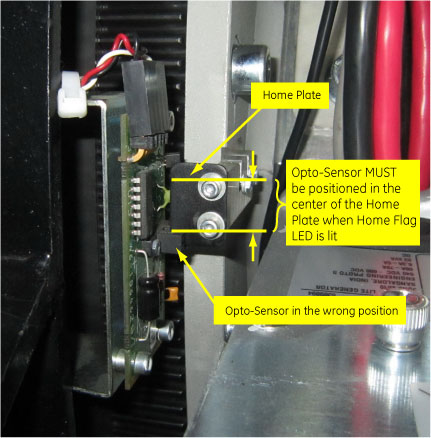
- At the same time, confirm that the HomeFlag LED (DS17) on TGPG
lights up, and no error code (260107223) appears in gesys.log after
gantry rotation by service switch.
260107223:
“Gantry (Axial) could NOT find the 'C' pulse”
“HW/SW Error: Retry Rx to verify probable Gantry Hardware problem.”
note:
The c-pulse and scribed line on the Encoder gear are Factory set. Do NOT loosen and screws on the Encoder gear.
Finalization
Perform Gantry Rotation Characterization to calibrate accurately.