- Topic ID: id_27090641
- Version: 2.0
- Date: Jun 10, 2020 2:29:47 AM
Cam Motor Driver Module Replacement
Prerequisites
Overview
This procedure describes the proper replacement procedure for the Cam Motor Driver.
Procedure
- Remove gantry covers as required.
Refer to
- Turn OFF all 3 service switches (Axial Drive, HVDC, 120 VAC).
 danger
- Position the gantry with the XRT at 6 o'clock.
- Remove the top cover from the Collimator by removing the five pan head M4 mounting screws that have spring washers.
- Remove the driver cover on motor mount assembly by removing
two pan head M4 screws with washers Figure 1.
Figure 1. Cam Motor Driver Replacement
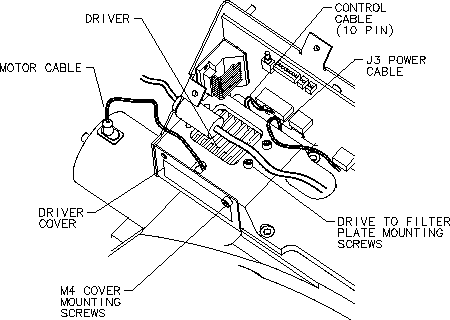
- Disconnect the three wire J3 power connector at the rear of the module.
- Disconnect the ten pin amp control cable at the rear of the module.
- Disconnect the drive to motor cable connection.
- Remove the four head cap screws 3 mm cap screws holding the drive to the filter top plate.
- Remove the cam motor driver module and place in container for return.
- Install new cam motor driver module with the four pan cap screws.
- Set the torque on the pan cap screws to the following:
- Connect the drive to motor cable.
- Connect the six wire motor phase drive connector.
- Connect the J3 power connector.
- Install the driver cover on motor mount assembly, making certain that the two tabs engage with the slots in the filter PWB Bracket.
- Tighten the two pan head M4 screws with spring washers.
- Replace the top cover of the Collimator using the five pan head mounting screws with spring washers and tighten.
note:
Please check the component P/N when replace the collimator related parts, should be ordered the same P/N according to the label on each component.
 |
Finalization
- Perform CAM A/B Motor Check.