- Topic ID: id_23554150
- Version: 2.0
- Date: Sep 26, 2020 10:12:47 PM
Tube Oil Cooling System Air Detection Test
Prerequisites
Overview
This document provides the necessary steps to check for image artifacts due to air in the tube oil cooling system.
1 Phantom Setup
Procedure
- Move table to longitudinal home position.
- Attach phantom holder to gantry end of cradle.
- Mount phantom to phantom holder.
- Place bubble level on top of phantom, positioned along Z-axis. Adjust phantom holder back knob until phantom is level front to back.
- Turn on laser alignment lights.
- Move table into gantry until axial internal alignment lights are aligned with phantom's axial reference mark.
- Adjust phantom holder side knob until sagittal internal alignment lights are aligned with phantom’s sagittal reference mark.
- Elevate table until coronal internal alignment lights are aligned with the phantom’s coronal reference mark.
- Set Internal Landmark.
2 Acquire Images
Procedure
- Click NEW PATIENT.note:
If Tube Warmup Attention window is displayed, click OK and skip tube warmup procedure.
- Type the following entries in the listed Patient Information
fields:
- Patient ID: Service
- Patient Name: Air Detection Test
- Select Service tab from Protocol Selection, Service Generic Scan.
- Modify the prescription by completing the following steps:
- Click SCAN TYPE.note:
All image groups are modified with the same values.
- Select 0.5 for Rotation Time and click OK.
- Click THICK SPEED.
- Select 10.0 for Detector Coverage (mm), 0.625 16i for Axial Thickness (mm) & Number of Images Per Rotation and click OK.
- Click START LOC.
- Enter S30 and press ENTER.
- Click END LOC..
- Enter S39.375 and press ENTER.
- Click SFOV.
- Select LARGE BODY.
- Click MA.
- Enter 310 for Manual mA and click OK.
- Click PREP GROUP (SEC).
- Enter 15 and press ENTER.
- Click DFOV.
- Enter 25 and press ENTER.
- Click RECON OPTION.
- Enter 40 for Windows Width, 0 for Windows Level and click OK.
- Click SCAN TYPE.
- Click CONFIRM.
- Press MOVE TO SCAN on GSCB when it flashes.
- Press START on GSCB when it flashes.
- Click, END EXAM.
- If a PPS Response window is displayed, click COMPLETE.
3 Image Review
Procedure
- Select ImageWorks desktop.
- Select scanned examination from List/Select browser.
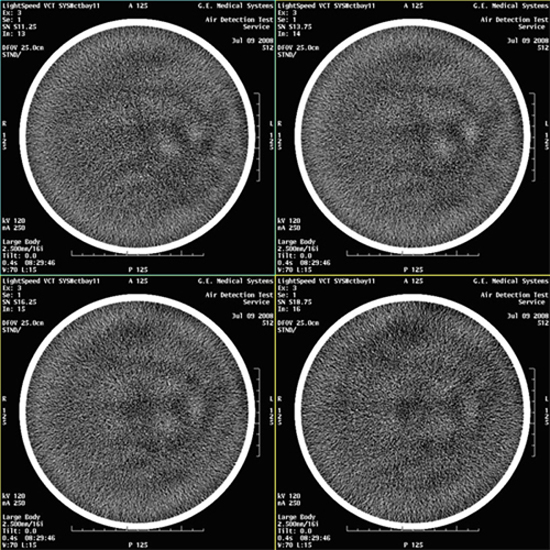
- Select VIEWER and review all images for
blotchy artifacts. (See Figure 1, Figure 2, and Figure 3). If an artifact is encountered, perform Tube Oil Cooling System Air Removal.note:
If air artifact exists, the air activity may be more significant in Images 13 through 16, 29 through 32, 45 through 48, and 61 through 64.
Figure 1. Images with No Air Artifacts
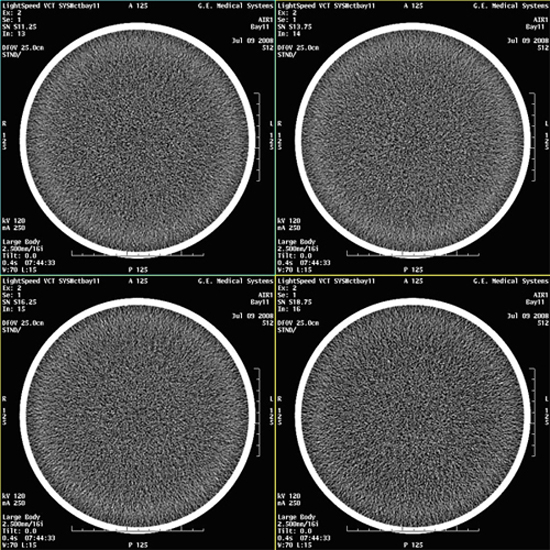
Figure 2. Images with Marginal Air Artifacts
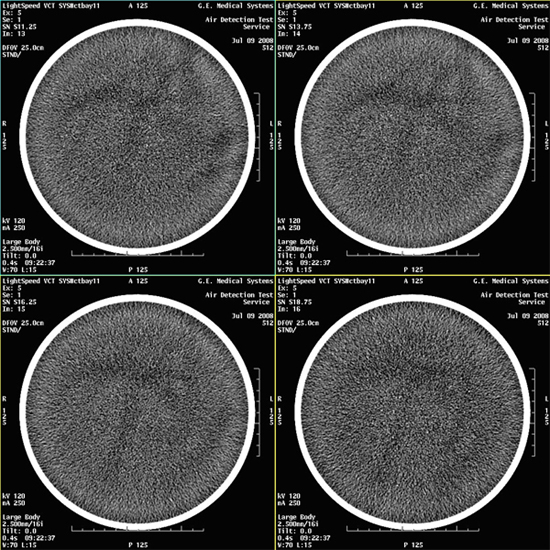
Figure 3. Images with Artifacts
4 Finalization
Finalization
No finalization steps.