- Topic ID: id_23554201
- Version: 2.0
- Date: Sep 26, 2020 10:14:35 PM
Touch Sensor R Assy Replacement
Prerequisites
Overview
Procedure
- Raise the Table to maximum height.
- Move the Cradle and IMS to OUT limit position.
- Remove power from Table by turning off 120VAC, Axial Drive and HVDC switches on Service Switch Panel.
- Remove the Top Cover (Right).
- Remove the Touch Plate by unscrewing 3 screws.
- Cut any tie-wraps, and disconnect the cable connector.
- Unscrew 5 screws, and remove the Touch Sensor R Assy from the
Table.
Figure 1. Touch Sensor R Assy
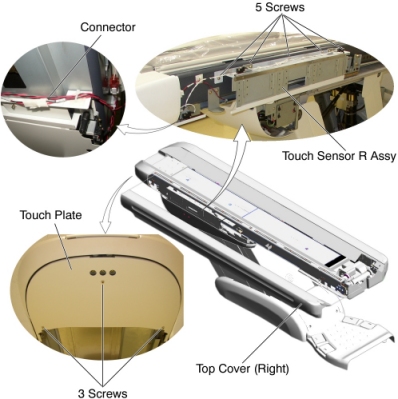
- Install the new Touch Sensor R Assy into place, and tighten the 5 screws.
- Connect the cable connector.
- Adjust the sensor position by two set screws (Refer to Side Touch Sensor Positioning).
- Re-install the Touch Plate.note:
Do not over tighten the 3 screws, otherwise the Touch Plate function will not work.
Finalization
- Power up the Table from the Service Switch Panel.
- Verify that the Touch Sensor R and the Touch Plate function are operating normally.
- Turn off all 3 switches (Axial Drive, HVDC, 120VAC), and re-install the Table covers.
- Push up the side touch plate, and verify that the touch sensor is activated without being hidden behind the Table top cover (Refer to Side Touch Sensor Positioning).